
Course Features
Price
Study Method
Online | Self-paced
Course Format
Interactive PDFs, Articles & Learning Resources
Duration
11 hours, 5 minutes
Qualification
Professional Skills Development Course
Assessment
Final MCQ Exam (included in price)
Certificate
Verifiable Digital Certificate - Free
Additional info
Lifetime Access | Start Instantly
- Share
Overview
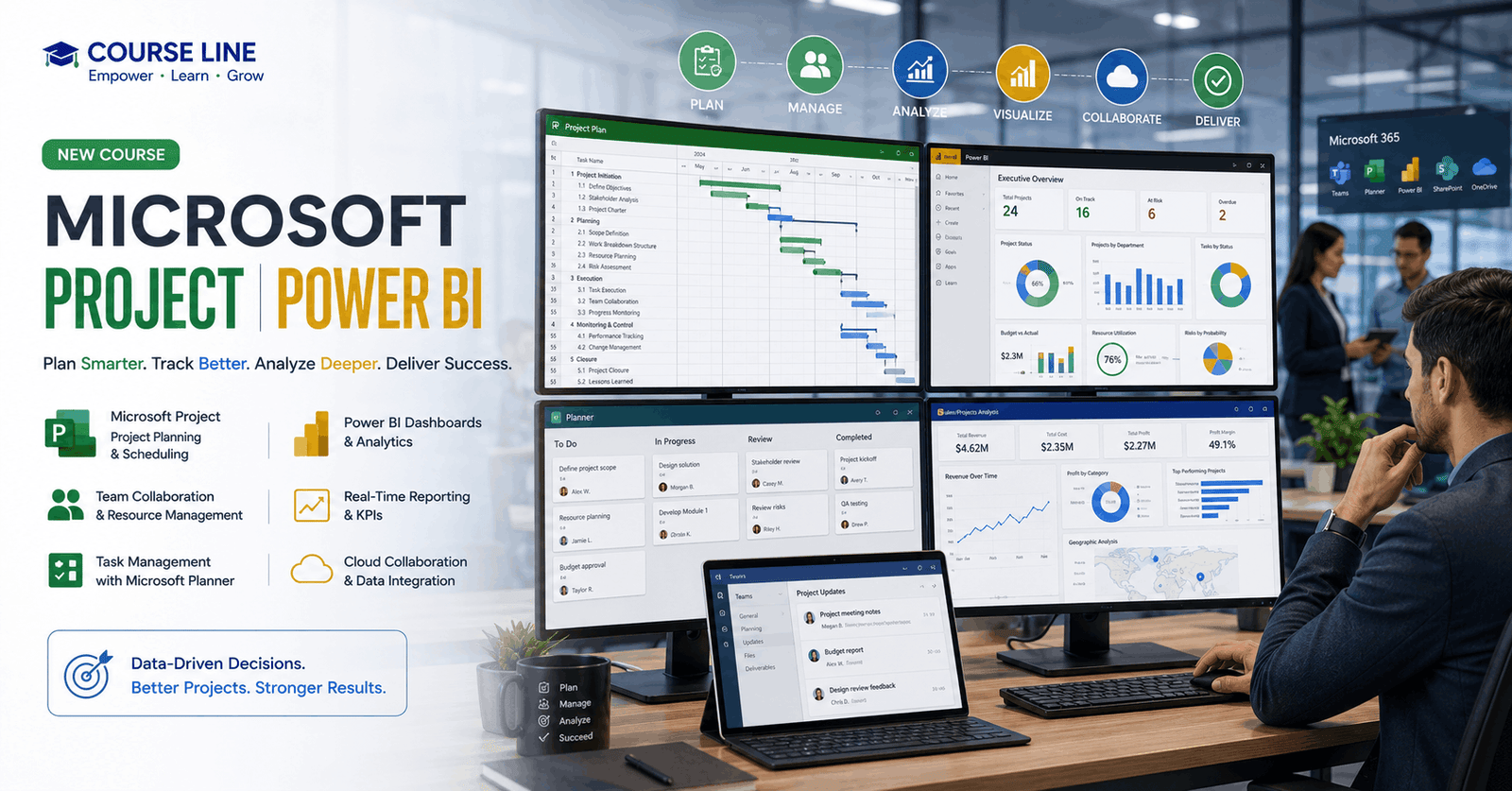
Microsoft Project Power BI provides a complete introduction to modern project management, task organisation, and data-driven reporting using Microsoft’s powerful productivity tools. This course is designed to help learners understand how Microsoft Project for the Web, Planner, and Power BI work together to support efficient planning, collaboration, monitoring, and decision-making in professional environments.
The course begins by introducing Microsoft Project for the Web and its role within modern project management workflows. You will learn how project plans are created, organised, and managed while understanding the differences between Planner, Project Online, and Project for the Web. This foundation helps you choose the right tools for different project requirements and business scenarios.
You will then explore Microsoft Planner and discover how to create plans, manage tasks, assign responsibilities, organise work using buckets and labels, track progress, and collaborate with team members. Practical lessons demonstrate how Planner integrates with Microsoft Teams, supports external collaboration, and improves visibility across projects. You will also learn how to export project data to Excel and analyse information using PivotTables.
The course continues with detailed training on Microsoft Project for the Web, covering project creation, task dependencies, timelines, assignments, attachments, checklists, roadmaps, and project sharing. These skills help you develop structured project plans and manage resources more effectively.
A key focus of this course is project reporting and analytics with Power BI. You will learn how Microsoft Power Platform, Dataverse, and Power BI connect with project data to create meaningful reports. The course covers visualisations, filters, dashboards, custom reports, and the Power BI Service, enabling you to transform project information into actionable insights.
By completing this course, you will gain practical skills in project planning, collaboration, reporting, and business intelligence. These capabilities are valuable for project managers, business analysts, team leaders, administrators, and professionals who want to improve productivity through Microsoft technologies.
Learners who successfully complete the course will receive a free course completion certificate. Those who wish to enhance their professional credentials can also purchase multiple premium certificate and official transcript options. Additionally, all students receive access to 5-star rated support available 24/7 through email, ensuring assistance throughout their learning journey.This course is ideal for project managers, business professionals, team coordinators, administrators, analysts, and Microsoft 365 users who want to improve project management and reporting skills. It is also suitable for beginners exploring digital project tools and professionals seeking practical experience with Microsoft’s modern workplace solutions.
Basic computer skills and familiarity with general workplace applications are recommended. No advanced project management or Power BI experience is required, as the course introduces concepts step by step. A willingness to learn Microsoft productivity tools and data reporting techniques is sufficient.
Who is this course for?
Microsoft Project Power BI provides a complete introduction to modern project management, task organisation, and data-driven reporting using Microsoft’s powerful productivity tools. This course is designed to help learners understand how Microsoft Project for the Web, Planner, and Power BI work together to support efficient planning, collaboration, monitoring, and decision-making in professional environments.
The course begins by introducing Microsoft Project for the Web and its role within modern project management workflows. You will learn how project plans are created, organised, and managed while understanding the differences between Planner, Project Online, and Project for the Web. This foundation helps you choose the right tools for different project requirements and business scenarios.
You will then explore Microsoft Planner and discover how to create plans, manage tasks, assign responsibilities, organise work using buckets and labels, track progress, and collaborate with team members. Practical lessons demonstrate how Planner integrates with Microsoft Teams, supports external collaboration, and improves visibility across projects. You will also learn how to export project data to Excel and analyse information using PivotTables.
The course continues with detailed training on Microsoft Project for the Web, covering project creation, task dependencies, timelines, assignments, attachments, checklists, roadmaps, and project sharing. These skills help you develop structured project plans and manage resources more effectively.
A key focus of this course is project reporting and analytics with Power BI. You will learn how Microsoft Power Platform, Dataverse, and Power BI connect with project data to create meaningful reports. The course covers visualisations, filters, dashboards, custom reports, and the Power BI Service, enabling you to transform project information into actionable insights.
By completing this course, you will gain practical skills in project planning, collaboration, reporting, and business intelligence. These capabilities are valuable for project managers, business analysts, team leaders, administrators, and professionals who want to improve productivity through Microsoft technologies.
Learners who successfully complete the course will receive a free course completion certificate. Those who wish to enhance their professional credentials can also purchase multiple premium certificate and official transcript options. Additionally, all students receive access to 5-star rated support available 24/7 through email, ensuring assistance throughout their learning journey.This course is ideal for project managers, business professionals, team coordinators, administrators, analysts, and Microsoft 365 users who want to improve project management and reporting skills. It is also suitable for beginners exploring digital project tools and professionals seeking practical experience with Microsoft’s modern workplace solutions.
Basic computer skills and familiarity with general workplace applications are recommended. No advanced project management or Power BI experience is required, as the course introduces concepts step by step. A willingness to learn Microsoft productivity tools and data reporting techniques is sufficient.
Requirements
Microsoft Project Power BI provides a complete introduction to modern project management, task organisation, and data-driven reporting using Microsoft’s powerful productivity tools. This course is designed to help learners understand how Microsoft Project for the Web, Planner, and Power BI work together to support efficient planning, collaboration, monitoring, and decision-making in professional environments.
The course begins by introducing Microsoft Project for the Web and its role within modern project management workflows. You will learn how project plans are created, organised, and managed while understanding the differences between Planner, Project Online, and Project for the Web. This foundation helps you choose the right tools for different project requirements and business scenarios.
You will then explore Microsoft Planner and discover how to create plans, manage tasks, assign responsibilities, organise work using buckets and labels, track progress, and collaborate with team members. Practical lessons demonstrate how Planner integrates with Microsoft Teams, supports external collaboration, and improves visibility across projects. You will also learn how to export project data to Excel and analyse information using PivotTables.
The course continues with detailed training on Microsoft Project for the Web, covering project creation, task dependencies, timelines, assignments, attachments, checklists, roadmaps, and project sharing. These skills help you develop structured project plans and manage resources more effectively.
A key focus of this course is project reporting and analytics with Power BI. You will learn how Microsoft Power Platform, Dataverse, and Power BI connect with project data to create meaningful reports. The course covers visualisations, filters, dashboards, custom reports, and the Power BI Service, enabling you to transform project information into actionable insights.
By completing this course, you will gain practical skills in project planning, collaboration, reporting, and business intelligence. These capabilities are valuable for project managers, business analysts, team leaders, administrators, and professionals who want to improve productivity through Microsoft technologies.
Learners who successfully complete the course will receive a free course completion certificate. Those who wish to enhance their professional credentials can also purchase multiple premium certificate and official transcript options. Additionally, all students receive access to 5-star rated support available 24/7 through email, ensuring assistance throughout their learning journey.This course is ideal for project managers, business professionals, team coordinators, administrators, analysts, and Microsoft 365 users who want to improve project management and reporting skills. It is also suitable for beginners exploring digital project tools and professionals seeking practical experience with Microsoft’s modern workplace solutions.
Basic computer skills and familiarity with general workplace applications are recommended. No advanced project management or Power BI experience is required, as the course introduces concepts step by step. A willingness to learn Microsoft productivity tools and data reporting techniques is sufficient.
Career path
Microsoft Project Power BI provides a complete introduction to modern project management, task organisation, and data-driven reporting using Microsoft’s powerful productivity tools. This course is designed to help learners understand how Microsoft Project for the Web, Planner, and Power BI work together to support efficient planning, collaboration, monitoring, and decision-making in professional environments.
The course begins by introducing Microsoft Project for the Web and its role within modern project management workflows. You will learn how project plans are created, organised, and managed while understanding the differences between Planner, Project Online, and Project for the Web. This foundation helps you choose the right tools for different project requirements and business scenarios.
You will then explore Microsoft Planner and discover how to create plans, manage tasks, assign responsibilities, organise work using buckets and labels, track progress, and collaborate with team members. Practical lessons demonstrate how Planner integrates with Microsoft Teams, supports external collaboration, and improves visibility across projects. You will also learn how to export project data to Excel and analyse information using PivotTables.
The course continues with detailed training on Microsoft Project for the Web, covering project creation, task dependencies, timelines, assignments, attachments, checklists, roadmaps, and project sharing. These skills help you develop structured project plans and manage resources more effectively.
A key focus of this course is project reporting and analytics with Power BI. You will learn how Microsoft Power Platform, Dataverse, and Power BI connect with project data to create meaningful reports. The course covers visualisations, filters, dashboards, custom reports, and the Power BI Service, enabling you to transform project information into actionable insights.
By completing this course, you will gain practical skills in project planning, collaboration, reporting, and business intelligence. These capabilities are valuable for project managers, business analysts, team leaders, administrators, and professionals who want to improve productivity through Microsoft technologies.
Learners who successfully complete the course will receive a free course completion certificate. Those who wish to enhance their professional credentials can also purchase multiple premium certificate and official transcript options. Additionally, all students receive access to 5-star rated support available 24/7 through email, ensuring assistance throughout their learning journey.This course is ideal for project managers, business professionals, team coordinators, administrators, analysts, and Microsoft 365 users who want to improve project management and reporting skills. It is also suitable for beginners exploring digital project tools and professionals seeking practical experience with Microsoft’s modern workplace solutions.
Basic computer skills and familiarity with general workplace applications are recommended. No advanced project management or Power BI experience is required, as the course introduces concepts step by step. A willingness to learn Microsoft productivity tools and data reporting techniques is sufficient.
-
- Welcome & Course Overview 00:10:00
- Essential Information for a Successful Training Experience 00:10:00
- Introduction to Project for the Web 00:10:00
- Comparing Planner, Project Online and Project for the Web 00:10:00
- Understanding Project Plans 00:10:00
- Hands-On Exercise 01 00:10:00
-
- What is Microsoft Planner and Why It’s Useful 00:10:00
- Creating a New Plan 00:10:00
- Creating an Outlook Group Plan 00:10:00
- Adding Members to a Plan 00:10:00
- Creating New Tasks 00:10:00
- Editing Task Details 00:10:00
- Organising Tasks into Buckets 00:10:00
- Updating Task Progress and Priority 00:10:00
- Attaching Files to Tasks 00:10:00
- Assigning Labels to Tasks 00:10:00
- Accessing Plans from Microsoft Teams 00:10:00
- Granting Access to External Users 00:10:00
- Using Smart Backgrounds 00:10:00
- Visualising Progress with Charts 00:10:00
- Receiving Email Notifications on Tasks and Plans 00:10:00
- Exporting a Plan to Excel & Analysing with PivotTables 00:10:00
- Hands-On Exercise 02 00:10:00
- Launching Project for the Web 00:10:00
- Exploring the Project for the Web Interface (Project Home) 00:10:00
- Importing a Project from Project Online Desktop 00:10:00
- Creating a Project Plan from Scratch 00:10:00
- Customising Column Headings 00:10:00
- Setting Project Start and End Dates 00:10:00
- Creating Tasks and Assigning People 00:10:00
- Creating Summary Tasks and Subtasks 00:10:00
- Managing Task Durations in Timeline View 00:10:00
- Updating Task Progress 00:10:00
- Adding Attachments, Notes and Checklists 00:10:00
- Grouping by Bucket 00:10:00
- Adding Task Dependencies 00:10:00
- Categorising Tasks with Labels 00:10:00
- Hiding and Removing Columns 00:10:00
- Adding a Status Column with Emojis 00:10:00
- Sharing Projects and Tasks (Co-Authoring) 00:10:00
- Visualising Projects in Microsoft Teams 00:10:00
- Building Project Roadmaps 00:10:00
- Exploring Extra Features in Project for the Web 00:10:00
- Hands-On Exercise 03 00:10:00
- Overview of Power BI Visualisations 00:10:00
- Creating Slicers to Filter Data 00:10:00
- Working with Tables and Matrix Tables 00:10:00
- Modifying and Formatting Charts 00:10:00
- Updating Reports with New Project Data 00:10:00
- Building Custom Reports from Scratch (Part 1) 00:10:00
- Building Custom Reports from Scratch (Part 2) 00:10:00
- Using the Power BI Service 00:10:00
- Assembling a Dashboard 00:10:00
- Hands-On Exercise 05 00:10:00
- Exam of Microsoft Project for the Web & Planner with Power BI – Complete Essentials 00:50:00

No Reviews found for this course.
Is this certificate recognized?
Yes, our premium certificate and transcript are widely recognized and accepted by embassies worldwide, particularly by the UK embassy. This adds credibility to your qualification and enhances its value for professional and academic purposes.
I am a beginner. Is this course suitable for me?
Yes, this course is designed for learners of all levels, including beginners. The content is structured to provide step-by-step guidance, ensuring that even those with no prior experience can follow along and gain valuable knowledge.
I am a professional. Is this course suitable for me?
Yes, professionals will also benefit from this course. It covers advanced concepts, practical applications, and industry insights that can help enhance existing skills and knowledge. Whether you are looking to refine your expertise or expand your qualifications, this course provides valuable learning.
Does this course have an expiry date?
No, you have lifetime access to the course. Once enrolled, you can revisit the materials at any time as long as the course remains available. Additionally, we regularly update our content to ensure it stays relevant and up to date.
How do I claim my free certificate?
I trust you’re in good health. Your free certificate can be located in the Achievement section. The option to purchase a CPD certificate is available but entirely optional, and you may choose to skip it. Please be aware that it’s crucial to click the “Complete” button to ensure the certificate is generated, as this process is entirely automated.
Does this course have assessments and assignments?
Yes, the course includes both assessments and assignments. Your final marks will be determined by a combination of 20% from assignments and 80% from assessments. These evaluations are designed to test your understanding and ensure you have grasped the key concepts effectively.
Is this course accredited?
We are a recognized course provider with CPD, UKRLP, and AOHT membership. The logos of these accreditation bodies will be featured on your premium certificate and transcript, ensuring credibility and professional recognition.
Will I receive a certificate upon completion?
Yes, you will receive a free digital certificate automatically once you complete the course. If you would like a premium CPD-accredited certificate, either in digital or physical format, you can upgrade for a small fee.
Course Features
Price
Study Method
Online | Self-paced
Course Format
Interactive PDFs, Articles & Learning Resources
Duration
11 hours, 5 minutes
Qualification
Professional Skills Development Course
Assessment
Final MCQ Exam (included in price)
Certificate
Verifiable Digital Certificate - Free
Additional info
Lifetime Access | Start Instantly
- Share

Financial Fraud Detection & Prevention: Advanced Forensic Accounting Training
Course Line237৳ 80,783.26Original price was: ৳ 80,783.26.৳ 2,471.31Current price is: ৳ 2,471.31.Certification in PTSD Counselling and Trauma Management
Course Line238৳ 80,783.26Original price was: ৳ 80,783.26.৳ 2,471.31Current price is: ৳ 2,471.31.Domestic Abuse Worker Level 3 Advanced Diploma
Course Line242৳ 80,783.26Original price was: ৳ 80,783.26.৳ 2,471.31Current price is: ৳ 2,471.31.



Related Courses
PRINCE2 in Practice: Simulated Projects & Case Studies
৳ 80,783.26Original price was: ৳ 80,783.26.৳ 2,471.31Current price is: ৳ 2,471.31.237PRINCE2 Risk Management: Identifying, Assessing & Controlling Risk
৳ 80,783.26Original price was: ৳ 80,783.26.৳ 2,471.31Current price is: ৳ 2,471.31.237PRINCE2 Roles & Responsibilities: Managing Teams in a PRINCE2 Environment
৳ 80,783.26Original price was: ৳ 80,783.26.৳ 2,471.31Current price is: ৳ 2,471.31.237

Related Courses
PRINCE2 in Practice: Simulated Projects & Case Studies
৳ 80,783.26Original price was: ৳ 80,783.26.৳ 2,471.31Current price is: ৳ 2,471.31.237PRINCE2 Risk Management: Identifying, Assessing & Controlling Risk
৳ 80,783.26Original price was: ৳ 80,783.26.৳ 2,471.31Current price is: ৳ 2,471.31.237PRINCE2 Roles & Responsibilities: Managing Teams in a PRINCE2 Environment
৳ 80,783.26Original price was: ৳ 80,783.26.৳ 2,471.31Current price is: ৳ 2,471.31.237

