
Course Features
Price
Study Method
Online | Self-paced
Course Format
Interactive PDFs, Articles & Learning Resources
Duration
10 hours, 25 minutes
Qualification
Professional Skills Development Course
Assessment
Final MCQ Exam (included in price)
Certificate
Verifiable Digital Certificate - Free
Additional info
Lifetime Access | Start Instantly
- Share
Overview
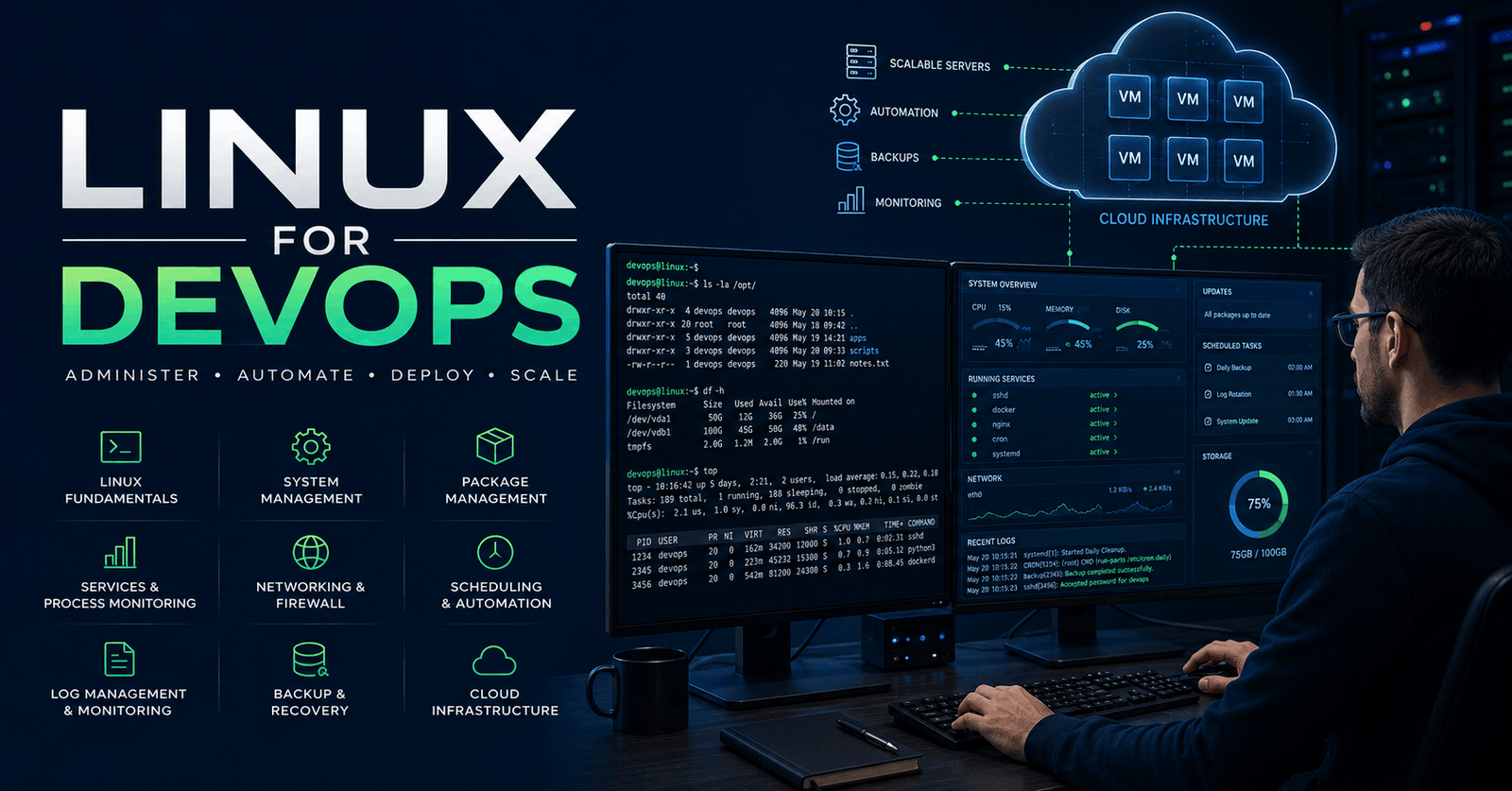
Linux for DevOps training provides a structured introduction to the Linux skills used across modern development, cloud and infrastructure environments. The course combines essential command-line knowledge with practical system administration, helping learners understand how Linux systems are configured, managed, monitored and maintained in workflows relevant to developers and aspiring DevOps professionals.
You will begin by exploring operating systems, the development of Unix and Linux, and the Linux filesystem hierarchy. The course also introduces cloud-based practice through the setup of a Linux virtual machine, helping you gain experience connecting to and working with a remote Linux environment. From there, you will develop confidence with commands for navigating directories, reading and editing files, searching for data and locating files efficiently.
User administration and permissions form an important part of the course. You will learn how accounts are created and managed, how file permissions work, and how ownership and elevated privileges can be controlled with tools such as chmod, chown, su and sudo. Package management is also covered across Ubuntu and Amazon Linux environments, alongside practical methods for installing and removing software.
The course then develops your understanding of service and process management. You will explore systemctl, service controls, process monitoring, termination, background and foreground jobs, process priorities and virtual memory monitoring. Networking lessons introduce tools for checking interfaces, viewing network statistics, testing connectivity, transferring data and downloading files.
Additional topics include file compression and archiving, Cron job scheduling, standard input and output, error redirection, wildcards, symbolic and hard links, system shutdown and reboot procedures, log management and file transfer between Linux and local systems. These skills provide a practical foundation for working more confidently with servers and infrastructure.
By completing the course, you can strengthen your Linux command-line ability, improve your understanding of system operations and prepare for further learning in DevOps, cloud computing and automation. Learners will receive a free course completion certificate after successfully completing the course. Multiple premium certificate and transcript options are also available for purchase if they wish. Students also have access to our 5-star rated support, available 24/7 through email, throughout their learning journey.Completing this course can support further development towards roles such as junior DevOps engineer, cloud support associate, Linux system administrator, infrastructure support technician or software developer working with Linux environments. Learners may also progress to advanced study in cloud platforms, CI/CD, containers, infrastructure automation, configuration management and site reliability engineering.
Who is this course for?
Linux for DevOps training provides a structured introduction to the Linux skills used across modern development, cloud and infrastructure environments. The course combines essential command-line knowledge with practical system administration, helping learners understand how Linux systems are configured, managed, monitored and maintained in workflows relevant to developers and aspiring DevOps professionals.
You will begin by exploring operating systems, the development of Unix and Linux, and the Linux filesystem hierarchy. The course also introduces cloud-based practice through the setup of a Linux virtual machine, helping you gain experience connecting to and working with a remote Linux environment. From there, you will develop confidence with commands for navigating directories, reading and editing files, searching for data and locating files efficiently.
User administration and permissions form an important part of the course. You will learn how accounts are created and managed, how file permissions work, and how ownership and elevated privileges can be controlled with tools such as chmod, chown, su and sudo. Package management is also covered across Ubuntu and Amazon Linux environments, alongside practical methods for installing and removing software.
The course then develops your understanding of service and process management. You will explore systemctl, service controls, process monitoring, termination, background and foreground jobs, process priorities and virtual memory monitoring. Networking lessons introduce tools for checking interfaces, viewing network statistics, testing connectivity, transferring data and downloading files.
Additional topics include file compression and archiving, Cron job scheduling, standard input and output, error redirection, wildcards, symbolic and hard links, system shutdown and reboot procedures, log management and file transfer between Linux and local systems. These skills provide a practical foundation for working more confidently with servers and infrastructure.
By completing the course, you can strengthen your Linux command-line ability, improve your understanding of system operations and prepare for further learning in DevOps, cloud computing and automation. Learners will receive a free course completion certificate after successfully completing the course. Multiple premium certificate and transcript options are also available for purchase if they wish. Students also have access to our 5-star rated support, available 24/7 through email, throughout their learning journey.Completing this course can support further development towards roles such as junior DevOps engineer, cloud support associate, Linux system administrator, infrastructure support technician or software developer working with Linux environments. Learners may also progress to advanced study in cloud platforms, CI/CD, containers, infrastructure automation, configuration management and site reliability engineering.
Requirements
Linux for DevOps training provides a structured introduction to the Linux skills used across modern development, cloud and infrastructure environments. The course combines essential command-line knowledge with practical system administration, helping learners understand how Linux systems are configured, managed, monitored and maintained in workflows relevant to developers and aspiring DevOps professionals.
You will begin by exploring operating systems, the development of Unix and Linux, and the Linux filesystem hierarchy. The course also introduces cloud-based practice through the setup of a Linux virtual machine, helping you gain experience connecting to and working with a remote Linux environment. From there, you will develop confidence with commands for navigating directories, reading and editing files, searching for data and locating files efficiently.
User administration and permissions form an important part of the course. You will learn how accounts are created and managed, how file permissions work, and how ownership and elevated privileges can be controlled with tools such as chmod, chown, su and sudo. Package management is also covered across Ubuntu and Amazon Linux environments, alongside practical methods for installing and removing software.
The course then develops your understanding of service and process management. You will explore systemctl, service controls, process monitoring, termination, background and foreground jobs, process priorities and virtual memory monitoring. Networking lessons introduce tools for checking interfaces, viewing network statistics, testing connectivity, transferring data and downloading files.
Additional topics include file compression and archiving, Cron job scheduling, standard input and output, error redirection, wildcards, symbolic and hard links, system shutdown and reboot procedures, log management and file transfer between Linux and local systems. These skills provide a practical foundation for working more confidently with servers and infrastructure.
By completing the course, you can strengthen your Linux command-line ability, improve your understanding of system operations and prepare for further learning in DevOps, cloud computing and automation. Learners will receive a free course completion certificate after successfully completing the course. Multiple premium certificate and transcript options are also available for purchase if they wish. Students also have access to our 5-star rated support, available 24/7 through email, throughout their learning journey.Completing this course can support further development towards roles such as junior DevOps engineer, cloud support associate, Linux system administrator, infrastructure support technician or software developer working with Linux environments. Learners may also progress to advanced study in cloud platforms, CI/CD, containers, infrastructure automation, configuration management and site reliability engineering.
Career path
Linux for DevOps training provides a structured introduction to the Linux skills used across modern development, cloud and infrastructure environments. The course combines essential command-line knowledge with practical system administration, helping learners understand how Linux systems are configured, managed, monitored and maintained in workflows relevant to developers and aspiring DevOps professionals.
You will begin by exploring operating systems, the development of Unix and Linux, and the Linux filesystem hierarchy. The course also introduces cloud-based practice through the setup of a Linux virtual machine, helping you gain experience connecting to and working with a remote Linux environment. From there, you will develop confidence with commands for navigating directories, reading and editing files, searching for data and locating files efficiently.
User administration and permissions form an important part of the course. You will learn how accounts are created and managed, how file permissions work, and how ownership and elevated privileges can be controlled with tools such as chmod, chown, su and sudo. Package management is also covered across Ubuntu and Amazon Linux environments, alongside practical methods for installing and removing software.
The course then develops your understanding of service and process management. You will explore systemctl, service controls, process monitoring, termination, background and foreground jobs, process priorities and virtual memory monitoring. Networking lessons introduce tools for checking interfaces, viewing network statistics, testing connectivity, transferring data and downloading files.
Additional topics include file compression and archiving, Cron job scheduling, standard input and output, error redirection, wildcards, symbolic and hard links, system shutdown and reboot procedures, log management and file transfer between Linux and local systems. These skills provide a practical foundation for working more confidently with servers and infrastructure.
By completing the course, you can strengthen your Linux command-line ability, improve your understanding of system operations and prepare for further learning in DevOps, cloud computing and automation. Learners will receive a free course completion certificate after successfully completing the course. Multiple premium certificate and transcript options are also available for purchase if they wish. Students also have access to our 5-star rated support, available 24/7 through email, throughout their learning journey.Completing this course can support further development towards roles such as junior DevOps engineer, cloud support associate, Linux system administrator, infrastructure support technician or software developer working with Linux environments. Learners may also progress to advanced study in cloud platforms, CI/CD, containers, infrastructure automation, configuration management and site reliability engineering.
-
- Course Introduction 00:10:00
- What is an Operating System (OS)? 00:10:00
- History and Evolution of Unix & Linux 00:10:00
- Creating an AWS Free Tier Account 00:10:00
- Launching a Linux Virtual Machine on AWS EC2 00:10:00
- Connecting to Your EC2 Linux VM 00:10:00
- Understanding the Linux Filesystem Hierarchy 00:10:00
-
- Essential Linux Commands Overview 00:10:00
- Listing Files and Directories with ls 00:10:00
- Navigating Directories Using cd 00:10:00
- Reading Files with less, more, tail, and head 00:10:00
- Creating and Editing Files with touch and nano 00:10:00
- Creating Directories 00:10:00
- Removing Files and Directories 00:10:00
- Finding Files with file and find Commands 00:10:00
- Searching Text with grep 00:10:00
- Introduction to User Administration in Linux 00:10:00
- Creating & Managing User Accounts (adduser & useradd) 00:10:00
- Understanding File Permissions 00:10:00
- Connecting to EC2 Linux VM as a Normal User 00:10:00
- Changing Permissions Using chmod 00:10:00
- Listing Files and Permissions with ls 00:10:00
- Changing Permissions with Symbolic Method 00:10:00
- Numeric Mode Permissions 00:10:00
- Changing Ownership with chown 00:10:00
- Creating and Managing Sudo Users 00:10:00
- Using su & sudo Commands 00:10:00
- Starting and Stopping Services with systemctl 00:10:00
- Enabling and Disabling Services with systemctl 00:10:00
- Using the service Command to Manage Services 00:10:00
- Checking Network Interfaces with ifconfig 00:10:00
- Viewing Network Statistics with netstat 00:10:00
- Testing Network Connectivity with ping 00:10:00
- Data Transfer with curl 00:10:00
- Downloading Files Using wget 00:10:00
- Automating Tasks Using Cron Jobs 00:10:00
- Creating and Managing Soft Links 00:10:00
- Creating and Managing Hard Links 00:10:00
- Shutting Down and Rebooting Linux Systems 00:10:00
- Viewing and Managing Log Files 00:10:00
- Transferring Files with WinSCP between 00:10:00
- Premium Certificate 00:15:00

No Reviews found for this course.
Is this certificate recognized?
Yes, our premium certificate and transcript are widely recognized and accepted by embassies worldwide, particularly by the UK embassy. This adds credibility to your qualification and enhances its value for professional and academic purposes.
I am a beginner. Is this course suitable for me?
Yes, this course is designed for learners of all levels, including beginners. The content is structured to provide step-by-step guidance, ensuring that even those with no prior experience can follow along and gain valuable knowledge.
I am a professional. Is this course suitable for me?
Yes, professionals will also benefit from this course. It covers advanced concepts, practical applications, and industry insights that can help enhance existing skills and knowledge. Whether you are looking to refine your expertise or expand your qualifications, this course provides valuable learning.
Does this course have an expiry date?
No, you have lifetime access to the course. Once enrolled, you can revisit the materials at any time as long as the course remains available. Additionally, we regularly update our content to ensure it stays relevant and up to date.
How do I claim my free certificate?
I trust you’re in good health. Your free certificate can be located in the Achievement section. The option to purchase a CPD certificate is available but entirely optional, and you may choose to skip it. Please be aware that it’s crucial to click the “Complete” button to ensure the certificate is generated, as this process is entirely automated.
Does this course have assessments and assignments?
Yes, the course includes both assessments and assignments. Your final marks will be determined by a combination of 20% from assignments and 80% from assessments. These evaluations are designed to test your understanding and ensure you have grasped the key concepts effectively.
Is this course accredited?
We are a recognized course provider with CPD, UKRLP, and AOHT membership. The logos of these accreditation bodies will be featured on your premium certificate and transcript, ensuring credibility and professional recognition.
Will I receive a certificate upon completion?
Yes, you will receive a free digital certificate automatically once you complete the course. If you would like a premium CPD-accredited certificate, either in digital or physical format, you can upgrade for a small fee.
Course Features
Price
Study Method
Online | Self-paced
Course Format
Interactive PDFs, Articles & Learning Resources
Duration
10 hours, 25 minutes
Qualification
Professional Skills Development Course
Assessment
Final MCQ Exam (included in price)
Certificate
Verifiable Digital Certificate - Free
Additional info
Lifetime Access | Start Instantly
- Share

Cyber Security Fundamentals for Beginners: Complete Guide to Threats, Attacks & Defence
Course Line237د.إ2,416.98Original price was: د.إ2,416.98.د.إ73.94Current price is: د.إ73.94.Certification in EMDR Therapy: Advanced Trauma Healing Techniques
Course Line237د.إ2,416.98Original price was: د.إ2,416.98.د.إ73.94Current price is: د.إ73.94.Certification in Pet Training and Care: Animal Behavior, First Aid, and Therapy
Course Line238د.إ2,416.98Original price was: د.إ2,416.98.د.إ73.94Current price is: د.إ73.94.



Related Courses
PRINCE2 in Practice: Simulated Projects & Case Studies
د.إ2,416.98Original price was: د.إ2,416.98.د.إ73.94Current price is: د.إ73.94.237PRINCE2 Risk Management: Identifying, Assessing & Controlling Risk
د.إ2,416.98Original price was: د.إ2,416.98.د.إ73.94Current price is: د.إ73.94.237PRINCE2 Roles & Responsibilities: Managing Teams in a PRINCE2 Environment
د.إ2,416.98Original price was: د.إ2,416.98.د.إ73.94Current price is: د.إ73.94.237



Related Courses
PRINCE2 in Practice: Simulated Projects & Case Studies
د.إ2,416.98Original price was: د.إ2,416.98.د.إ73.94Current price is: د.إ73.94.237PRINCE2 Risk Management: Identifying, Assessing & Controlling Risk
د.إ2,416.98Original price was: د.إ2,416.98.د.إ73.94Current price is: د.إ73.94.237PRINCE2 Roles & Responsibilities: Managing Teams in a PRINCE2 Environment
د.إ2,416.98Original price was: د.إ2,416.98.د.إ73.94Current price is: د.إ73.94.237

