
Course Features
Price
Study Method
Online | Self-paced
Course Format
Interactive PDFs, Articles & Learning Resources
Duration
16 hours, 35 minutes
Qualification
Professional Skills Development Course
Assessment
Final MCQ Exam (included in price)
Certificate
Verifiable Digital Certificate - Free
Additional info
Lifetime Access | Start Instantly
- Share
Overview
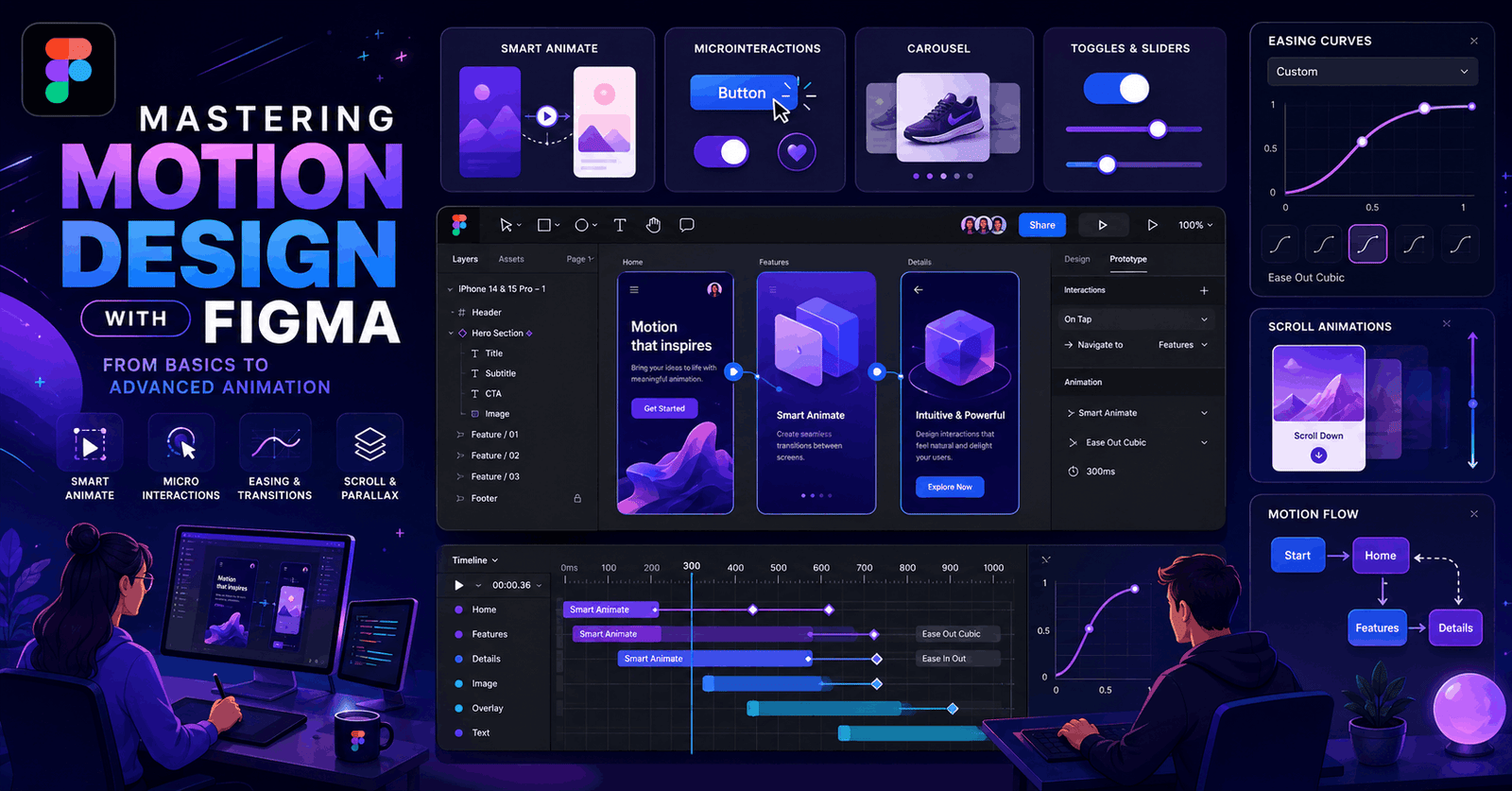
Figma Motion Design is a complete, hands-on learning program designed to help you master modern UI animation and interactive design from the ground up. This course takes you beyond static interfaces and teaches you how to bring digital products to life using motion, transitions, and microinteractions inside Figma.
You will begin with the fundamentals of motion design, learning why animation matters in user experience and how it improves usability, storytelling, and user engagement. As you progress, you will gain full command of Figma’s core tools, including frames, auto layout, constraints, and responsive design principles that form the foundation of professional UI design workflows.
The course then moves into advanced motion concepts such as Smart Animate, easing techniques, parallax effects, overlays, and interactive components. You will learn how to design smooth transitions, build engaging microinteractions, and create dynamic user flows that feel intuitive and polished. Every concept is reinforced through practical exercises such as navigation animations, carousel interactions, and real-world UI projects.
A key strength of this course is its project-based structure. You will work on hands-on assignments like designing landing page animations, interactive buttons, drag interactions, and full motion prototypes. These projects help you build a professional portfolio that demonstrates your ability to design real-world motion experiences.
You will also explore advanced motion design principles such as timing, offset, parenting, masking, and dimensional animation techniques. These skills will help you create visually appealing and highly functional digital experiences that stand out in today’s competitive design industry.
By the end of the course, you will be confident in creating professional-level UI animations and interactive prototypes using Figma, ready to apply your skills in real projects or freelance opportunities.
Upon completion, learners will receive a free course completion certificate. In addition, multiple premium certificate and transcript options are available for purchase for those who want enhanced academic or professional documentation. Students also benefit from 5-star rated 24/7 email support, ensuring continuous guidance throughout their learning journey.
Who is this course for?
Figma Motion Design is a complete, hands-on learning program designed to help you master modern UI animation and interactive design from the ground up. This course takes you beyond static interfaces and teaches you how to bring digital products to life using motion, transitions, and microinteractions inside Figma.
You will begin with the fundamentals of motion design, learning why animation matters in user experience and how it improves usability, storytelling, and user engagement. As you progress, you will gain full command of Figma’s core tools, including frames, auto layout, constraints, and responsive design principles that form the foundation of professional UI design workflows.
The course then moves into advanced motion concepts such as Smart Animate, easing techniques, parallax effects, overlays, and interactive components. You will learn how to design smooth transitions, build engaging microinteractions, and create dynamic user flows that feel intuitive and polished. Every concept is reinforced through practical exercises such as navigation animations, carousel interactions, and real-world UI projects.
A key strength of this course is its project-based structure. You will work on hands-on assignments like designing landing page animations, interactive buttons, drag interactions, and full motion prototypes. These projects help you build a professional portfolio that demonstrates your ability to design real-world motion experiences.
You will also explore advanced motion design principles such as timing, offset, parenting, masking, and dimensional animation techniques. These skills will help you create visually appealing and highly functional digital experiences that stand out in today’s competitive design industry.
By the end of the course, you will be confident in creating professional-level UI animations and interactive prototypes using Figma, ready to apply your skills in real projects or freelance opportunities.
Upon completion, learners will receive a free course completion certificate. In addition, multiple premium certificate and transcript options are available for purchase for those who want enhanced academic or professional documentation. Students also benefit from 5-star rated 24/7 email support, ensuring continuous guidance throughout their learning journey.
Requirements
Figma Motion Design is a complete, hands-on learning program designed to help you master modern UI animation and interactive design from the ground up. This course takes you beyond static interfaces and teaches you how to bring digital products to life using motion, transitions, and microinteractions inside Figma.
You will begin with the fundamentals of motion design, learning why animation matters in user experience and how it improves usability, storytelling, and user engagement. As you progress, you will gain full command of Figma’s core tools, including frames, auto layout, constraints, and responsive design principles that form the foundation of professional UI design workflows.
The course then moves into advanced motion concepts such as Smart Animate, easing techniques, parallax effects, overlays, and interactive components. You will learn how to design smooth transitions, build engaging microinteractions, and create dynamic user flows that feel intuitive and polished. Every concept is reinforced through practical exercises such as navigation animations, carousel interactions, and real-world UI projects.
A key strength of this course is its project-based structure. You will work on hands-on assignments like designing landing page animations, interactive buttons, drag interactions, and full motion prototypes. These projects help you build a professional portfolio that demonstrates your ability to design real-world motion experiences.
You will also explore advanced motion design principles such as timing, offset, parenting, masking, and dimensional animation techniques. These skills will help you create visually appealing and highly functional digital experiences that stand out in today’s competitive design industry.
By the end of the course, you will be confident in creating professional-level UI animations and interactive prototypes using Figma, ready to apply your skills in real projects or freelance opportunities.
Upon completion, learners will receive a free course completion certificate. In addition, multiple premium certificate and transcript options are available for purchase for those who want enhanced academic or professional documentation. Students also benefit from 5-star rated 24/7 email support, ensuring continuous guidance throughout their learning journey.
Career path
Figma Motion Design is a complete, hands-on learning program designed to help you master modern UI animation and interactive design from the ground up. This course takes you beyond static interfaces and teaches you how to bring digital products to life using motion, transitions, and microinteractions inside Figma.
You will begin with the fundamentals of motion design, learning why animation matters in user experience and how it improves usability, storytelling, and user engagement. As you progress, you will gain full command of Figma’s core tools, including frames, auto layout, constraints, and responsive design principles that form the foundation of professional UI design workflows.
The course then moves into advanced motion concepts such as Smart Animate, easing techniques, parallax effects, overlays, and interactive components. You will learn how to design smooth transitions, build engaging microinteractions, and create dynamic user flows that feel intuitive and polished. Every concept is reinforced through practical exercises such as navigation animations, carousel interactions, and real-world UI projects.
A key strength of this course is its project-based structure. You will work on hands-on assignments like designing landing page animations, interactive buttons, drag interactions, and full motion prototypes. These projects help you build a professional portfolio that demonstrates your ability to design real-world motion experiences.
You will also explore advanced motion design principles such as timing, offset, parenting, masking, and dimensional animation techniques. These skills will help you create visually appealing and highly functional digital experiences that stand out in today’s competitive design industry.
By the end of the course, you will be confident in creating professional-level UI animations and interactive prototypes using Figma, ready to apply your skills in real projects or freelance opportunities.
Upon completion, learners will receive a free course completion certificate. In addition, multiple premium certificate and transcript options are available for purchase for those who want enhanced academic or professional documentation. Students also benefit from 5-star rated 24/7 email support, ensuring continuous guidance throughout their learning journey.
-
- Welcome to the Course & Online Classroom 00:10:00
- Why Motion Design Matters 00:10:00
- Common Misconceptions About Motion Design 00:10:00
- How Motion Enhances Usability 00:10:00
- Narrative and Mental Models in Motion Design 00:10:00
- Next Steps: Choosing Your Path 00:10:00
-
- Figma Overview 00:10:00
- Figma Account Setup 00:10:00
- Navigating the Figma Interface: Structure 00:10:00
- Navigating the Figma Interface Files 00:10:00
- Navigating the Figma Interface Toolbar 00:10:00
- Navigating the Figma Interface Left Sidebars 00:10:00
- Navigating the Figma Interface Right Sidebars 00:10:00
- Working with Frames 00:10:00
- Working with, Groups 00:10:00
- Working with Boolean Operations 00:10:00
- Using Images in Figma 00:10:00
- Using Text in Figma 00:10:00
- Applying Constraints in Design 00:10:00
- Using Auto Layout 00:10:00
- Auto Layout Basics and Properties 00:10:00
- Using Community Files 00:10:00
- Installing and Managing Plugins 00:10:00
- Sharing, Comments, and Collaboration Tools 00:10:00
- What is Smart Animate? 00:10:00
- Smart Animate Properties Explained 00:10:00
- Parallax Exercise 00:10:00
- New Message Animation Exercise 00:10:00
- Overlay Effects Exercise 00:10:00
- Interactive Components Overview 00:10:00
- Interactive Buttons Exercise 00:10:00
- Introduction to Key Motion Concepts 00:10:00
- Easing Techniques 00:10:00
- Offset and Delay Explained 00:10:00
- Parenting in Animation 00:10:00
- Transformations in Motion 00:10:00
- Value Change Techniques 00:10:00
- Masking Effects 00:10:00
- Overlay Usage 00:10:00
- Cloning 00:10:00
- Obscuration 00:10:00
- Parallax Effects 00:10:00
- Dimensionality in Motion 00:10:00
- Dolly and Zoom Techniques 00:10:00
- Simple Carousel Dots Paging 00:10:00
- Carousel Animation Paging 00:10:00
- Dragging Listing Cards 00:10:00
- Image Drag Exercise 00:10:00
- Dragging Through Content 00:10:00
- Drag and Drop Exercise 00:10:00
- Discovery and Research Parts 1 00:10:00
- Discovery and Research Parts 2 00:10:00
- Design and Storyboarding 00:10:00
- Prototyping Basics 00:10:00
- Testing Your Motion Designs 00:10:00
- Helpful Tips for Motion Designers 00:10:00
- Understanding Microinteractions 00:10:00
- Importance of Microinteractions 00:10:00
- Exam of Mastering Motion Design with Figma: From Basics to Advanced Animation 00:50:00

No Reviews found for this course.
Is this certificate recognized?
Yes, our premium certificate and transcript are widely recognized and accepted by embassies worldwide, particularly by the UK embassy. This adds credibility to your qualification and enhances its value for professional and academic purposes.
I am a beginner. Is this course suitable for me?
Yes, this course is designed for learners of all levels, including beginners. The content is structured to provide step-by-step guidance, ensuring that even those with no prior experience can follow along and gain valuable knowledge.
I am a professional. Is this course suitable for me?
Yes, professionals will also benefit from this course. It covers advanced concepts, practical applications, and industry insights that can help enhance existing skills and knowledge. Whether you are looking to refine your expertise or expand your qualifications, this course provides valuable learning.
Does this course have an expiry date?
No, you have lifetime access to the course. Once enrolled, you can revisit the materials at any time as long as the course remains available. Additionally, we regularly update our content to ensure it stays relevant and up to date.
How do I claim my free certificate?
I trust you’re in good health. Your free certificate can be located in the Achievement section. The option to purchase a CPD certificate is available but entirely optional, and you may choose to skip it. Please be aware that it’s crucial to click the “Complete” button to ensure the certificate is generated, as this process is entirely automated.
Does this course have assessments and assignments?
Yes, the course includes both assessments and assignments. Your final marks will be determined by a combination of 20% from assignments and 80% from assessments. These evaluations are designed to test your understanding and ensure you have grasped the key concepts effectively.
Is this course accredited?
We are a recognized course provider with CPD, UKRLP, and AOHT membership. The logos of these accreditation bodies will be featured on your premium certificate and transcript, ensuring credibility and professional recognition.
Will I receive a certificate upon completion?
Yes, you will receive a free digital certificate automatically once you complete the course. If you would like a premium CPD-accredited certificate, either in digital or physical format, you can upgrade for a small fee.
Course Features
Price
Study Method
Online | Self-paced
Course Format
Interactive PDFs, Articles & Learning Resources
Duration
16 hours, 35 minutes
Qualification
Professional Skills Development Course
Assessment
Final MCQ Exam (included in price)
Certificate
Verifiable Digital Certificate - Free
Additional info
Lifetime Access | Start Instantly
- Share

Master Krita 5.0: Digital Art Fundamentals with Hands-On Exercises
Course Line237₽50,942.16Original price was: ₽50,942.16.₽1,558.41Current price is: ₽1,558.41.Strength and Conditioning for Basketball Level 3 Advanced Diploma
Course Line237₽50,942.16Original price was: ₽50,942.16.₽1,558.41Current price is: ₽1,558.41.Beginner’s Guide to Gene Editing in Biotechnology: Tools, Applications & Ethics
Course Line237₽50,942.16Original price was: ₽50,942.16.₽1,558.41Current price is: ₽1,558.41.

Related Courses
AutoCAD Floor Plan Rendering in Photoshop: Architectural Visualisation Professional Training
₽50,942.16Original price was: ₽50,942.16.₽1,558.41Current price is: ₽1,558.41.237Professional Photography Masterclass: Camera, Lighting, Composition & Portraits
₽50,942.16Original price was: ₽50,942.16.₽1,558.41Current price is: ₽1,558.41.237Adobe Photoshop CC MasterClass: From Beginner to Advanced Digital Artist
₽50,942.16Original price was: ₽50,942.16.₽1,558.41Current price is: ₽1,558.41.237


Related Courses
AutoCAD Floor Plan Rendering in Photoshop: Architectural Visualisation Professional Training
₽50,942.16Original price was: ₽50,942.16.₽1,558.41Current price is: ₽1,558.41.237Professional Photography Masterclass: Camera, Lighting, Composition & Portraits
₽50,942.16Original price was: ₽50,942.16.₽1,558.41Current price is: ₽1,558.41.237Adobe Photoshop CC MasterClass: From Beginner to Advanced Digital Artist
₽50,942.16Original price was: ₽50,942.16.₽1,558.41Current price is: ₽1,558.41.237

