
Course Features
Price
Study Method
Online | Self-paced
Course Format
Interactive PDFs, Articles & Learning Resources
Duration
9 hours, 45 minutes
Qualification
Professional Skills Development Course
Assessment
Final MCQ Exam (included in price)
Certificate
Verifiable Digital Certificate - Free
Additional info
Lifetime Access | Start Instantly
- Share
Overview
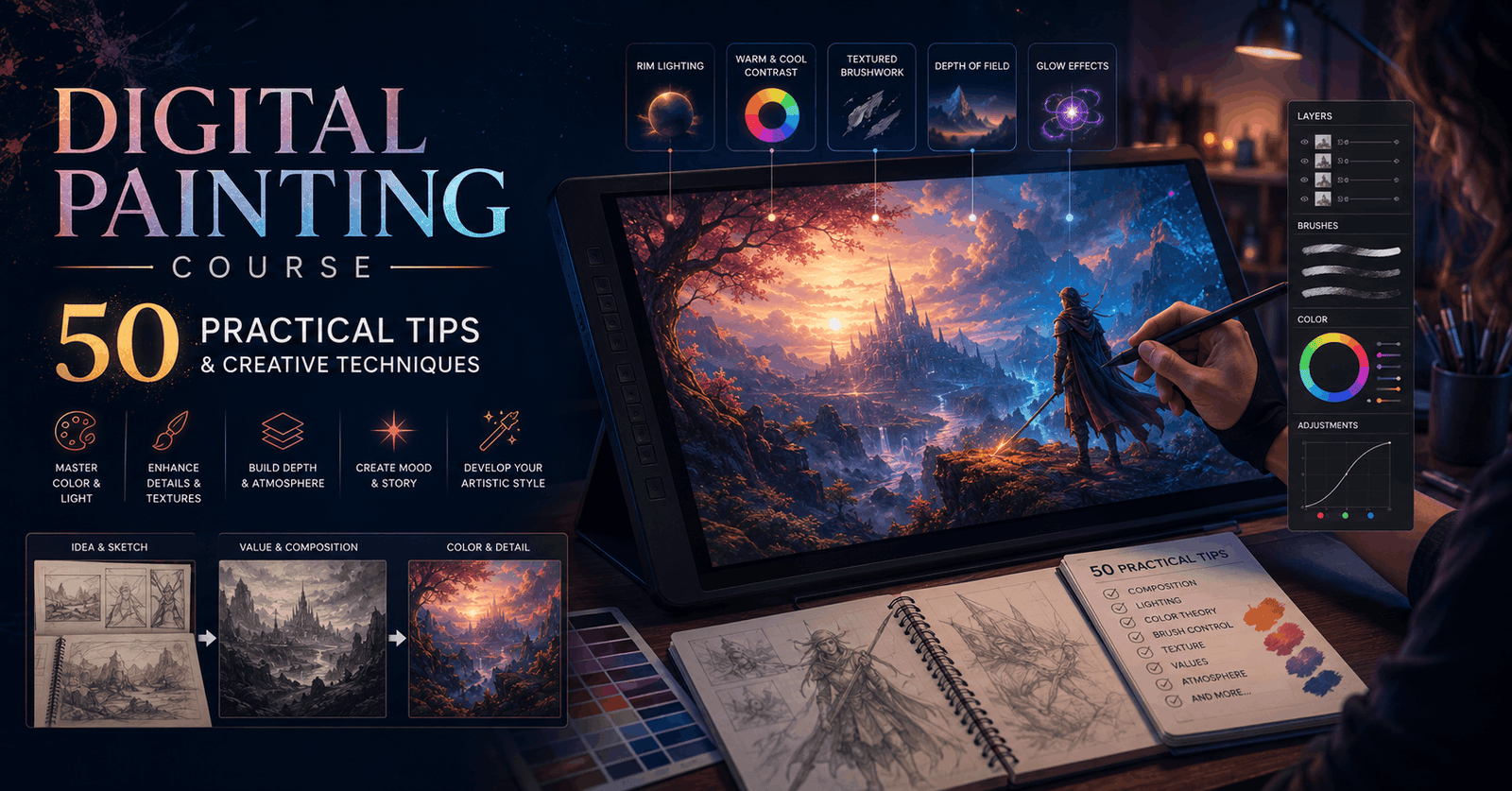
Digital Painting Course brings together 50 practical tips and techniques designed to help artists improve the quality, efficiency and creative impact of their digital artwork. Rather than following a single painting project from beginning to end, the course delivers focused insights that can be applied across different subjects, styles and creative workflows.
The course begins with essential digital painting tools before moving into techniques for strengthening values, textures and tonal control. Learners explore ways to adjust contrast, work with curves, shift colour palettes and configure pressure sensitivity for more natural strokes. These skills can help create a more responsive and personalised digital painting environment.
Lighting and colour form a major part of the learning experience. Topics include ambient light, backlighting, bounce light, highlights, coloured shadows and methods for converting grayscale artwork into colour. Learners also examine brush and layer modes, stroke control, canvas size, DPI and approaches for creating greater visual depth and atmosphere.
The course continues with practical methods for improving texture, composition and presentation. Learners explore gradient creation, depth of field, glow effects, gradient maps, noise, painterly backgrounds and texture overlays. Additional techniques include canvas flipping, selection tools, photobashing concepts, reference workflows and methods for importing traditional sketches into a digital process.
Later lessons focus on details, visual effects and workflow efficiency. Learners examine surface markings, text integration, brush choices, thumbnail planning, colour harmony, iterative layers, shortcuts, perspective adjustments and symmetry tools. Together, these techniques provide a broad collection of creative strategies that can be incorporated into an existing artistic process.
Because each tip addresses a specific challenge or opportunity, learners can return to individual lessons whenever they need a practical solution or creative refresh. The course can help artists experiment more confidently, refine their workflow and make more informed decisions about colour, lighting, texture and composition.
After successfully completing the course, learners will receive a free course completion certificate. Multiple premium certificate and transcript options are also available for purchase for those who want additional documentation. Students also have access to 5-star rated support available 24/7 through email throughout their learning journey.Who is this course for?
Digital Painting Course brings together 50 practical tips and techniques designed to help artists improve the quality, efficiency and creative impact of their digital artwork. Rather than following a single painting project from beginning to end, the course delivers focused insights that can be applied across different subjects, styles and creative workflows.
The course begins with essential digital painting tools before moving into techniques for strengthening values, textures and tonal control. Learners explore ways to adjust contrast, work with curves, shift colour palettes and configure pressure sensitivity for more natural strokes. These skills can help create a more responsive and personalised digital painting environment.
Lighting and colour form a major part of the learning experience. Topics include ambient light, backlighting, bounce light, highlights, coloured shadows and methods for converting grayscale artwork into colour. Learners also examine brush and layer modes, stroke control, canvas size, DPI and approaches for creating greater visual depth and atmosphere.
The course continues with practical methods for improving texture, composition and presentation. Learners explore gradient creation, depth of field, glow effects, gradient maps, noise, painterly backgrounds and texture overlays. Additional techniques include canvas flipping, selection tools, photobashing concepts, reference workflows and methods for importing traditional sketches into a digital process.
Later lessons focus on details, visual effects and workflow efficiency. Learners examine surface markings, text integration, brush choices, thumbnail planning, colour harmony, iterative layers, shortcuts, perspective adjustments and symmetry tools. Together, these techniques provide a broad collection of creative strategies that can be incorporated into an existing artistic process.
Because each tip addresses a specific challenge or opportunity, learners can return to individual lessons whenever they need a practical solution or creative refresh. The course can help artists experiment more confidently, refine their workflow and make more informed decisions about colour, lighting, texture and composition.
After successfully completing the course, learners will receive a free course completion certificate. Multiple premium certificate and transcript options are also available for purchase for those who want additional documentation. Students also have access to 5-star rated support available 24/7 through email throughout their learning journey.Requirements
Digital Painting Course brings together 50 practical tips and techniques designed to help artists improve the quality, efficiency and creative impact of their digital artwork. Rather than following a single painting project from beginning to end, the course delivers focused insights that can be applied across different subjects, styles and creative workflows.
The course begins with essential digital painting tools before moving into techniques for strengthening values, textures and tonal control. Learners explore ways to adjust contrast, work with curves, shift colour palettes and configure pressure sensitivity for more natural strokes. These skills can help create a more responsive and personalised digital painting environment.
Lighting and colour form a major part of the learning experience. Topics include ambient light, backlighting, bounce light, highlights, coloured shadows and methods for converting grayscale artwork into colour. Learners also examine brush and layer modes, stroke control, canvas size, DPI and approaches for creating greater visual depth and atmosphere.
The course continues with practical methods for improving texture, composition and presentation. Learners explore gradient creation, depth of field, glow effects, gradient maps, noise, painterly backgrounds and texture overlays. Additional techniques include canvas flipping, selection tools, photobashing concepts, reference workflows and methods for importing traditional sketches into a digital process.
Later lessons focus on details, visual effects and workflow efficiency. Learners examine surface markings, text integration, brush choices, thumbnail planning, colour harmony, iterative layers, shortcuts, perspective adjustments and symmetry tools. Together, these techniques provide a broad collection of creative strategies that can be incorporated into an existing artistic process.
Because each tip addresses a specific challenge or opportunity, learners can return to individual lessons whenever they need a practical solution or creative refresh. The course can help artists experiment more confidently, refine their workflow and make more informed decisions about colour, lighting, texture and composition.
After successfully completing the course, learners will receive a free course completion certificate. Multiple premium certificate and transcript options are also available for purchase for those who want additional documentation. Students also have access to 5-star rated support available 24/7 through email throughout their learning journey.Career path
Digital Painting Course brings together 50 practical tips and techniques designed to help artists improve the quality, efficiency and creative impact of their digital artwork. Rather than following a single painting project from beginning to end, the course delivers focused insights that can be applied across different subjects, styles and creative workflows.
The course begins with essential digital painting tools before moving into techniques for strengthening values, textures and tonal control. Learners explore ways to adjust contrast, work with curves, shift colour palettes and configure pressure sensitivity for more natural strokes. These skills can help create a more responsive and personalised digital painting environment.
Lighting and colour form a major part of the learning experience. Topics include ambient light, backlighting, bounce light, highlights, coloured shadows and methods for converting grayscale artwork into colour. Learners also examine brush and layer modes, stroke control, canvas size, DPI and approaches for creating greater visual depth and atmosphere.
The course continues with practical methods for improving texture, composition and presentation. Learners explore gradient creation, depth of field, glow effects, gradient maps, noise, painterly backgrounds and texture overlays. Additional techniques include canvas flipping, selection tools, photobashing concepts, reference workflows and methods for importing traditional sketches into a digital process.
Later lessons focus on details, visual effects and workflow efficiency. Learners examine surface markings, text integration, brush choices, thumbnail planning, colour harmony, iterative layers, shortcuts, perspective adjustments and symmetry tools. Together, these techniques provide a broad collection of creative strategies that can be incorporated into an existing artistic process.
Because each tip addresses a specific challenge or opportunity, learners can return to individual lessons whenever they need a practical solution or creative refresh. The course can help artists experiment more confidently, refine their workflow and make more informed decisions about colour, lighting, texture and composition.
After successfully completing the course, learners will receive a free course completion certificate. Multiple premium certificate and transcript options are also available for purchase for those who want additional documentation. Students also have access to 5-star rated support available 24/7 through email throughout their learning journey.-
- Welcome to the Course! 00:10:00
- Essential Tools for Digital Painting 00:10:00
-
- Adding Contrast to Your Value Range 00:10:00
- Wrapping Texture Around Forms 00:00:00
- Adjusting Curves for Better Tone Control 00:10:00
- Using Hue Sliders to Shift Color Palettes 00:10:00
- Fine-Tuning Palm Rejection Settings 00:10:00
- Adjusting Pressure Sensitivity for Natural Strokes 00:10:00
- Working with Ambient Light 00:10:00
- Creating Realistic Backlighting Effects 00:10:00
- Using Blurred Image Overlays 00:10:00
- Enhancing Scenes with Bounce Light 00:10:00
- Choosing the Right Brush Cursor Settings 00:10:00
- Brush Modes vs. Layer Modes Explained 00:10:00
- Streamlining Your Brush Strokes 00:10:00
- Burning in Highlights for Drama 00:10:00
- Understanding Canvas Size and DPI 00:10:00
- Picking Effective Highlight Colors 00:10:00
- Converting Grayscale to Color 00:10:00
- How to Paint Colored Line Art 00:10:00
- Painting with Colored Shadows 00:10:00
- Creating Color Variation via Brush Settings 00:10:00
- Custom Gradient Creation for Lighting Effects 00:10:00
- Using Layer Modes for Graphic Effects 00:10:00
- Painting Simple Ground Shadows 00:10:00
- Creating Depth of Field in Backgrounds 00:10:00
- Why You Shouldn’t Start with a White Background 00:10:00
- Fixing Facial Banding Issues 00:10:00
- Flipping the Canvas to Improve Proportions 00:10:00
- Adding Glitch Effects and Creative Filters 00:10:00
- How to Add Glow Effects 00:10:00
- Using Gradient Maps for Stylised Coloring 00:10:00
- Using Half-to-Black for Shadow Rendering 00:10:00
- Using Lasso & Selection Tools for Precision 00:10:00
- Applying Noise Filters for Texture 00:10:00
- Painting Loose, Painterly Backgrounds 00:10:00
- Introduction to Photobashing 00:10:00
- Working with Reference Photo Mode 00:10:00
- Painting with Rim Lighting for Drama 00:10:00
- Scanning and Importing Traditional Sketches 00:10:00
- Starting with Loose Sketches for Better Flow 00:10:00
- Painting Tattoos and Surface Markings 00:10:00
- Wrapping Text into Your Compositions 00:10:00
- Comparing Texture Brushes vs. Smooth Brushes 00:10:00
- Using Texture Overlays for Realism 00:10:00
- Thumbnail Mode: Speed Up Visual Planning 00:10:00
- Color Harmony: Tying Your Palette Together 00:10:00
- Using Cool Colors to Enhance Warm Light 00:10:00
- Using Layers to Explore Multiple Iterations 00:10:00
- Speeding Up Workflow with Shortcuts & Hotkeys 00:10:00
- Using the Skew Tool for Perspective Fixes 00:10:00
- Creating Symmetry with Symmetry Tool 00:10:00
- Final Thoughts and Farewell 00:10:00
- Premium Certificate 00:15:00

No Reviews found for this course.
Is this certificate recognized?
Yes, our premium certificate and transcript are widely recognized and accepted by embassies worldwide, particularly by the UK embassy. This adds credibility to your qualification and enhances its value for professional and academic purposes.
I am a beginner. Is this course suitable for me?
Yes, this course is designed for learners of all levels, including beginners. The content is structured to provide step-by-step guidance, ensuring that even those with no prior experience can follow along and gain valuable knowledge.
I am a professional. Is this course suitable for me?
Yes, professionals will also benefit from this course. It covers advanced concepts, practical applications, and industry insights that can help enhance existing skills and knowledge. Whether you are looking to refine your expertise or expand your qualifications, this course provides valuable learning.
Does this course have an expiry date?
No, you have lifetime access to the course. Once enrolled, you can revisit the materials at any time as long as the course remains available. Additionally, we regularly update our content to ensure it stays relevant and up to date.
How do I claim my free certificate?
I trust you’re in good health. Your free certificate can be located in the Achievement section. The option to purchase a CPD certificate is available but entirely optional, and you may choose to skip it. Please be aware that it’s crucial to click the “Complete” button to ensure the certificate is generated, as this process is entirely automated.
Does this course have assessments and assignments?
Yes, the course includes both assessments and assignments. Your final marks will be determined by a combination of 20% from assignments and 80% from assessments. These evaluations are designed to test your understanding and ensure you have grasped the key concepts effectively.
Is this course accredited?
We are a recognized course provider with CPD, UKRLP, and AOHT membership. The logos of these accreditation bodies will be featured on your premium certificate and transcript, ensuring credibility and professional recognition.
Will I receive a certificate upon completion?
Yes, you will receive a free digital certificate automatically once you complete the course. If you would like a premium CPD-accredited certificate, either in digital or physical format, you can upgrade for a small fee.
Course Features
Price
Study Method
Online | Self-paced
Course Format
Interactive PDFs, Articles & Learning Resources
Duration
9 hours, 45 minutes
Qualification
Professional Skills Development Course
Assessment
Final MCQ Exam (included in price)
Certificate
Verifiable Digital Certificate - Free
Additional info
Lifetime Access | Start Instantly
- Share

Python-docx from Beginner to Winner: Create and Style Word Documents with Python
Course Line237£490.00Original price was: £490.00.£14.99Current price is: £14.99.NLP Practitioner Training
Course Line238£490.00Original price was: £490.00.£14.99Current price is: £14.99.Draughtsmanship Level 3 Advanced Diploma
Course Line237£490.00Original price was: £490.00.£14.99Current price is: £14.99.



Related Courses
AutoCAD Floor Plan Rendering in Photoshop: Architectural Visualisation Professional Training
£490.00Original price was: £490.00.£14.99Current price is: £14.99.237Professional Photography Masterclass: Camera, Lighting, Composition & Portraits
£490.00Original price was: £490.00.£14.99Current price is: £14.99.237Adobe Photoshop CC MasterClass: From Beginner to Advanced Digital Artist
£490.00Original price was: £490.00.£14.99Current price is: £14.99.237


Related Courses
AutoCAD Floor Plan Rendering in Photoshop: Architectural Visualisation Professional Training
£490.00Original price was: £490.00.£14.99Current price is: £14.99.237Professional Photography Masterclass: Camera, Lighting, Composition & Portraits
£490.00Original price was: £490.00.£14.99Current price is: £14.99.237Adobe Photoshop CC MasterClass: From Beginner to Advanced Digital Artist
£490.00Original price was: £490.00.£14.99Current price is: £14.99.237

