
Course Features
Price
Study Method
Online | Self-paced
Course Format
Interactive PDFs, Articles & Learning Resources
Duration
10 hours, 35 minutes
Qualification
Professional Skills Development Course
Assessment
Final MCQ Exam (included in price)
Certificate
Verifiable Digital Certificate - Free
Additional info
Lifetime Access | Start Instantly
- Share
Overview
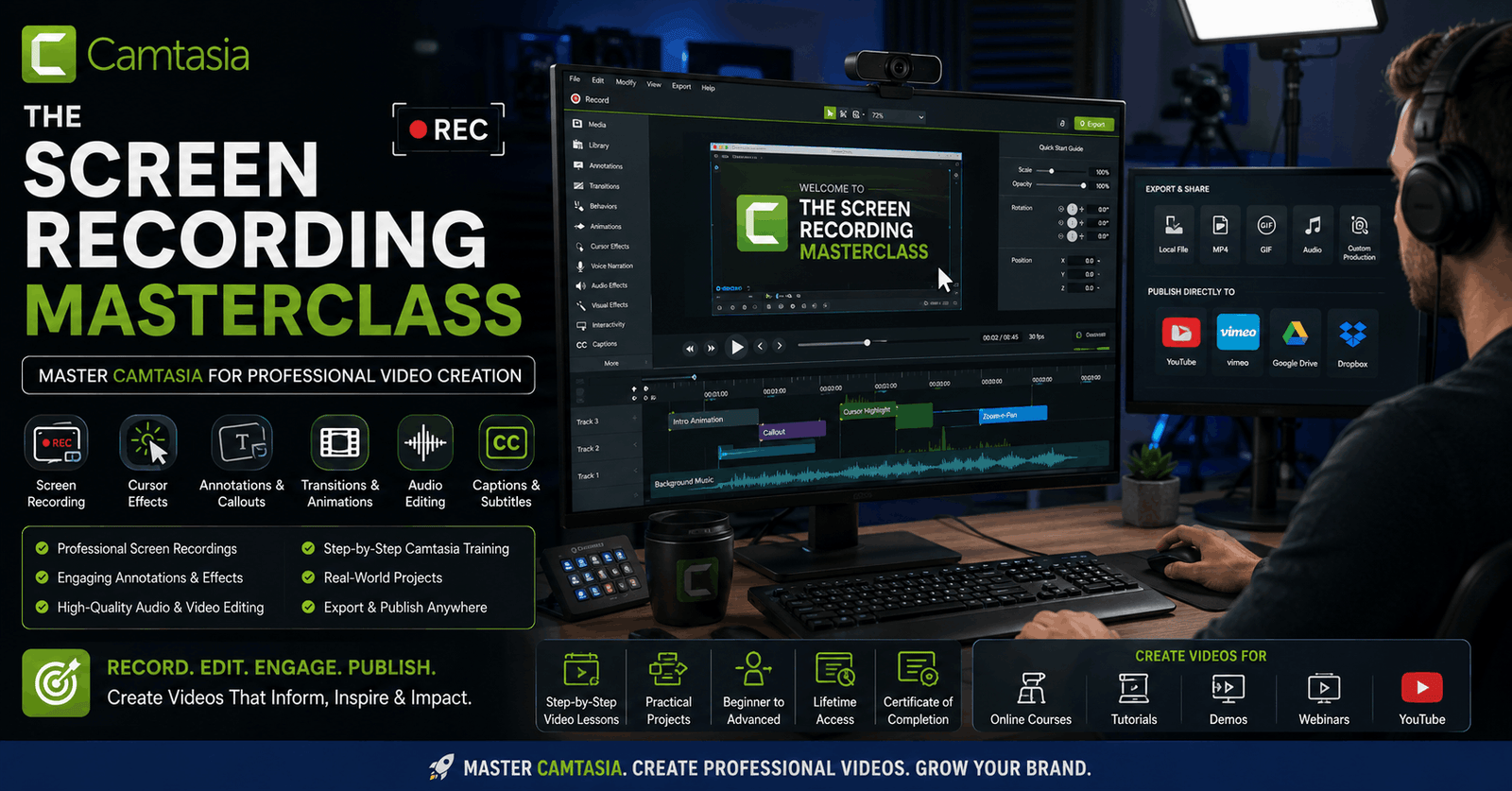
Camtasia Masterclass is a comprehensive training programme designed for learners who want to master screen recording, video editing, and professional content production using Camtasia. Whether you are creating tutorials, educational content, business presentations, training videos, or marketing materials, this course provides the practical knowledge needed to produce high-quality videos with confidence.
This course takes you through the complete video creation workflow, from recording your screen to editing polished final content. You will learn how to capture presentations, software demonstrations, and tutorials while maintaining clarity and professionalism. The course also covers essential editing techniques such as timeline management, annotations, transitions, animations, cursor effects, audio enhancements, captions, and interactive content creation.
Beyond basic editing, this training introduces advanced production techniques that can significantly improve the quality and engagement of your videos. You will explore quizzes, surveys, hotspots, picture-in-picture effects, voice narration, batch production, and publishing options for multiple platforms. These features help transform simple recordings into professional, interactive learning experiences.
A major strength of this course is its practical approach. Instead of focusing only on software features, it teaches how to create efficient workflows that improve productivity and reduce editing time. You will also gain valuable insights into recording setup, microphone selection, multi-screen workflows, project organisation, and best practices for smooth production.
By the end of this course, you will have the confidence to record, edit, enhance, and publish professional-quality videos for a wide range of purposes. Whether you are a content creator, educator, entrepreneur, or business professional, the skills gained here can help you produce more engaging and impactful video content.
Learners who successfully complete this course will receive a free course completion certificate. Multiple premium certificate and transcript options are also available for purchase for those who wish to strengthen their academic or professional profile. Students also receive 5-star rated support available 24/7 through email, ensuring reliable guidance throughout the learning journey.Who is this course for?
Camtasia Masterclass is a comprehensive training programme designed for learners who want to master screen recording, video editing, and professional content production using Camtasia. Whether you are creating tutorials, educational content, business presentations, training videos, or marketing materials, this course provides the practical knowledge needed to produce high-quality videos with confidence.
This course takes you through the complete video creation workflow, from recording your screen to editing polished final content. You will learn how to capture presentations, software demonstrations, and tutorials while maintaining clarity and professionalism. The course also covers essential editing techniques such as timeline management, annotations, transitions, animations, cursor effects, audio enhancements, captions, and interactive content creation.
Beyond basic editing, this training introduces advanced production techniques that can significantly improve the quality and engagement of your videos. You will explore quizzes, surveys, hotspots, picture-in-picture effects, voice narration, batch production, and publishing options for multiple platforms. These features help transform simple recordings into professional, interactive learning experiences.
A major strength of this course is its practical approach. Instead of focusing only on software features, it teaches how to create efficient workflows that improve productivity and reduce editing time. You will also gain valuable insights into recording setup, microphone selection, multi-screen workflows, project organisation, and best practices for smooth production.
By the end of this course, you will have the confidence to record, edit, enhance, and publish professional-quality videos for a wide range of purposes. Whether you are a content creator, educator, entrepreneur, or business professional, the skills gained here can help you produce more engaging and impactful video content.
Learners who successfully complete this course will receive a free course completion certificate. Multiple premium certificate and transcript options are also available for purchase for those who wish to strengthen their academic or professional profile. Students also receive 5-star rated support available 24/7 through email, ensuring reliable guidance throughout the learning journey.Requirements
Camtasia Masterclass is a comprehensive training programme designed for learners who want to master screen recording, video editing, and professional content production using Camtasia. Whether you are creating tutorials, educational content, business presentations, training videos, or marketing materials, this course provides the practical knowledge needed to produce high-quality videos with confidence.
This course takes you through the complete video creation workflow, from recording your screen to editing polished final content. You will learn how to capture presentations, software demonstrations, and tutorials while maintaining clarity and professionalism. The course also covers essential editing techniques such as timeline management, annotations, transitions, animations, cursor effects, audio enhancements, captions, and interactive content creation.
Beyond basic editing, this training introduces advanced production techniques that can significantly improve the quality and engagement of your videos. You will explore quizzes, surveys, hotspots, picture-in-picture effects, voice narration, batch production, and publishing options for multiple platforms. These features help transform simple recordings into professional, interactive learning experiences.
A major strength of this course is its practical approach. Instead of focusing only on software features, it teaches how to create efficient workflows that improve productivity and reduce editing time. You will also gain valuable insights into recording setup, microphone selection, multi-screen workflows, project organisation, and best practices for smooth production.
By the end of this course, you will have the confidence to record, edit, enhance, and publish professional-quality videos for a wide range of purposes. Whether you are a content creator, educator, entrepreneur, or business professional, the skills gained here can help you produce more engaging and impactful video content.
Learners who successfully complete this course will receive a free course completion certificate. Multiple premium certificate and transcript options are also available for purchase for those who wish to strengthen their academic or professional profile. Students also receive 5-star rated support available 24/7 through email, ensuring reliable guidance throughout the learning journey.Career path
Camtasia Masterclass is a comprehensive training programme designed for learners who want to master screen recording, video editing, and professional content production using Camtasia. Whether you are creating tutorials, educational content, business presentations, training videos, or marketing materials, this course provides the practical knowledge needed to produce high-quality videos with confidence.
This course takes you through the complete video creation workflow, from recording your screen to editing polished final content. You will learn how to capture presentations, software demonstrations, and tutorials while maintaining clarity and professionalism. The course also covers essential editing techniques such as timeline management, annotations, transitions, animations, cursor effects, audio enhancements, captions, and interactive content creation.
Beyond basic editing, this training introduces advanced production techniques that can significantly improve the quality and engagement of your videos. You will explore quizzes, surveys, hotspots, picture-in-picture effects, voice narration, batch production, and publishing options for multiple platforms. These features help transform simple recordings into professional, interactive learning experiences.
A major strength of this course is its practical approach. Instead of focusing only on software features, it teaches how to create efficient workflows that improve productivity and reduce editing time. You will also gain valuable insights into recording setup, microphone selection, multi-screen workflows, project organisation, and best practices for smooth production.
By the end of this course, you will have the confidence to record, edit, enhance, and publish professional-quality videos for a wide range of purposes. Whether you are a content creator, educator, entrepreneur, or business professional, the skills gained here can help you produce more engaging and impactful video content.
Learners who successfully complete this course will receive a free course completion certificate. Multiple premium certificate and transcript options are also available for purchase for those who wish to strengthen their academic or professional profile. Students also receive 5-star rated support available 24/7 through email, ensuring reliable guidance throughout the learning journey.-
- Course Introduction 00:10:00
- Accessing the Camtasia 9 Interface 00:10:00
- Basic Screen Recording Controls and Capture 00:10:00
- Exploring the Recording Toolbar Effects Menu 00:10:00
- Navigating the Tools Menu Options 00:10:00
- Help Menu & TechSmith Account Access 00:10:00
- Understanding Recorded Inputs in Recording Toolbar 00:10:00
- Selecting Area Section for Recording 00:10:00
- Brief Example of the Recording Process 00:10:00
- Actual Screen Recording of a PowerPoint Presentation 00:10:00
-
- Overview of the Editing Screen Timeline 00:10:00
- Using Timeline Tools Effectively 00:10:00
- Adding and Using Markers 00:10:00
- Creating a Table of Contents with Markers 00:10:00
- Adding Quizzes and Surveys to Your Timeline 00:10:00
- Managing Media Bin and Saving Projects 00:10:00
- Utilizing Library Elements from Media Bin 00:10:00
- Working with Annotations 00:10:00
- Applying Transitions between Clips 00:10:00
- Exploring the Behaviors Tab for Animations 00:10:00
- Adding Animations to Your Project 00:10:00
- Recording a Short Video to Demonstrate Effects 00:10:00
- Adding Cursor Effects 00:10:00
- Recording and Editing Voice Narration 00:10:00
- Applying Audio Effects 00:10:00
- Creating Interactive Hotspots 00:10:00
- Using Quizzing and Surveys for Engagement 00:10:00
- Adding Captions and Subtitles 00:10:00
- Starting a New Project via File Menu 00:10:00
- Opening Projects and Adjusting Project Settings 00:10:00
- Exporting and Importing Libraries 00:10:00
- Using Multiple Screens Efficiently 00:10:00
- Setting Your PC at Eye Level for Comfort 00:10:00
- Affordable Noise-Cancelling Microphone Setup 00:10:00
- Building Your Production Machine 00:10:00
- Managing Project Files 00:10:00
- Tips for Recording in One Take 00:10:00
- Using Webcams and Picture-in-Picture Effects 00:10:00
- Drawing Tool Basics 00:10:00
- Pre-Recording Preparation Tips 00:10:00
- Creating Animated GIFs with Camtasia 00:10:00
- Using Camtasia for Customer Service Videos 00:10:00
- Embedding Screencast.com Videos into WordPress 00:10:00
- Creating Table of Contents and Interactive Content 00:10:00
- Daisy Chain Hotspots for Navigation 00:10:00
- Chaining Surveys for User Engagement 00:10:00
- Using Picture-in-Picture and the Color Out Tool 00:10:00
- Premium Certificate 00:15:00

No Reviews found for this course.
Is this certificate recognized?
Yes, our premium certificate and transcript are widely recognized and accepted by embassies worldwide, particularly by the UK embassy. This adds credibility to your qualification and enhances its value for professional and academic purposes.
I am a beginner. Is this course suitable for me?
Yes, this course is designed for learners of all levels, including beginners. The content is structured to provide step-by-step guidance, ensuring that even those with no prior experience can follow along and gain valuable knowledge.
I am a professional. Is this course suitable for me?
Yes, professionals will also benefit from this course. It covers advanced concepts, practical applications, and industry insights that can help enhance existing skills and knowledge. Whether you are looking to refine your expertise or expand your qualifications, this course provides valuable learning.
Does this course have an expiry date?
No, you have lifetime access to the course. Once enrolled, you can revisit the materials at any time as long as the course remains available. Additionally, we regularly update our content to ensure it stays relevant and up to date.
How do I claim my free certificate?
I trust you’re in good health. Your free certificate can be located in the Achievement section. The option to purchase a CPD certificate is available but entirely optional, and you may choose to skip it. Please be aware that it’s crucial to click the “Complete” button to ensure the certificate is generated, as this process is entirely automated.
Does this course have assessments and assignments?
Yes, the course includes both assessments and assignments. Your final marks will be determined by a combination of 20% from assignments and 80% from assessments. These evaluations are designed to test your understanding and ensure you have grasped the key concepts effectively.
Is this course accredited?
We are a recognized course provider with CPD, UKRLP, and AOHT membership. The logos of these accreditation bodies will be featured on your premium certificate and transcript, ensuring credibility and professional recognition.
Will I receive a certificate upon completion?
Yes, you will receive a free digital certificate automatically once you complete the course. If you would like a premium CPD-accredited certificate, either in digital or physical format, you can upgrade for a small fee.
Course Features
Price
Study Method
Online | Self-paced
Course Format
Interactive PDFs, Articles & Learning Resources
Duration
10 hours, 35 minutes
Qualification
Professional Skills Development Course
Assessment
Final MCQ Exam (included in price)
Certificate
Verifiable Digital Certificate - Free
Additional info
Lifetime Access | Start Instantly
- Share

Statistics Level 8 Advanced Diploma
Course Line237$946.79Original price was: $946.79.$28.96Current price is: $28.96.Domestic Abuse Worker Level 3 Advanced Diploma
Course Line242$946.79Original price was: $946.79.$28.96Current price is: $28.96.


Related Courses
Email Marketing Mastery: Build, Automate & Optimise High-Converting Campaigns
$946.79Original price was: $946.79.$28.96Current price is: $28.96.237Social Media Marketing Strategy: Build, Plan & Grow Your Business Online
$946.79Original price was: $946.79.$28.96Current price is: $28.96.237Professional Photography Masterclass: Camera, Lighting, Composition & Portraits
$946.79Original price was: $946.79.$28.96Current price is: $28.96.237


Related Courses
Email Marketing Mastery: Build, Automate & Optimise High-Converting Campaigns
$946.79Original price was: $946.79.$28.96Current price is: $28.96.237Social Media Marketing Strategy: Build, Plan & Grow Your Business Online
$946.79Original price was: $946.79.$28.96Current price is: $28.96.237Professional Photography Masterclass: Camera, Lighting, Composition & Portraits
$946.79Original price was: $946.79.$28.96Current price is: $28.96.237

