
Course Features
Price
Study Method
Online | Self-paced
Course Format
Interactive PDFs, Articles & Learning Resources
Duration
5 hours, 15 minutes
Qualification
Professional Skills Development Course
Assessment
Final MCQ Exam (included in price)
Certificate
Verifiable Digital Certificate - Free
Additional info
Lifetime Access | Start Instantly
- Share
Overview
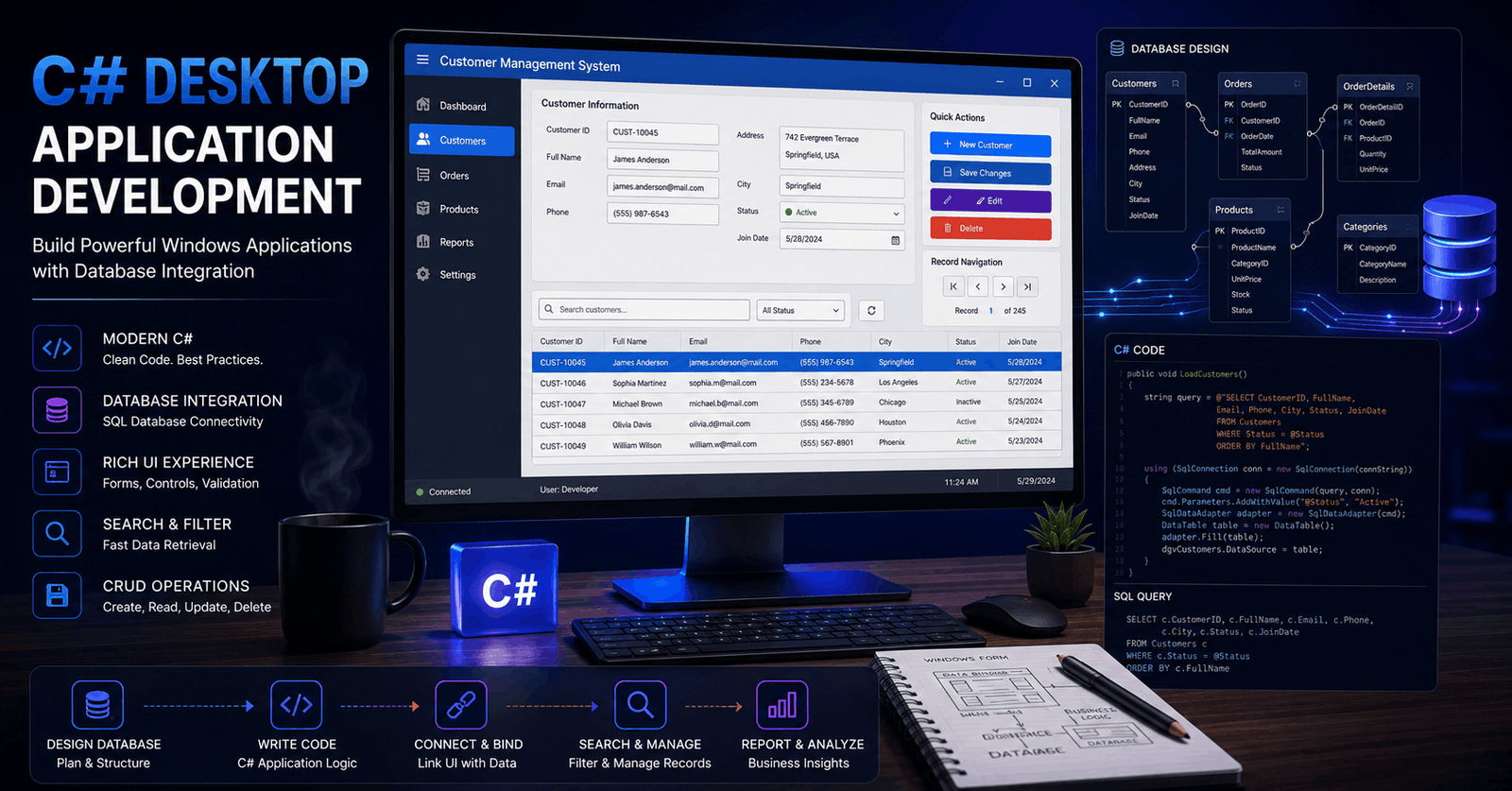
C# Desktop Application development combines programming, database design and user interface creation to build practical software for managing information. This course provides a structured introduction to creating database-driven Windows desktop applications, guiding learners from relational database setup through application connectivity, interface design, data binding and record management.
The course begins with SQL Server database creation and management. Learners explore how to create databases and tables, define relationships between related datasets and insert information into relational structures. The use of database views is also introduced, helping students understand how stored data can be organised and presented for application use.
Attention then moves to connecting a C# application to a SQL Server database. Through progressive coding lessons, learners develop an understanding of how a desktop program communicates with stored data. This provides an important foundation for building applications that can retrieve, display and manage information through a graphical interface.
The user interface section focuses on practical Windows Forms development. Learners work with controls used in business-style applications, including BindingNavigator, GroupBox, TextBox and DataGridView. They also explore interface enhancements such as custom form icons and status bars. Search functionality is introduced to demonstrate how users can locate information efficiently within a data-driven application.
A significant part of the course is dedicated to data binding. Learners examine how controls can be connected to data sources, how existing bindings can be cleared and how both simple and complex binding approaches work. These concepts help explain the relationship between the application interface and the underlying database.
The course also develops record-management functionality. Learners work through the process of creating an “Add New” feature and use SQL INSERT INTO statements to add records from the application to the database. This practical workflow demonstrates how database operations can be integrated into interactive desktop software.
Flexible online delivery allows learners to study at their own pace and revisit technical lessons whenever needed. Students also have access to 5-star rated support available 24/7 through email throughout their learning experience.
Upon successful completion, learners receive a free course completion certificate. Those seeking additional documentation may also choose from multiple premium certificate and transcript options available for purchase.Who is this course for?
C# Desktop Application development combines programming, database design and user interface creation to build practical software for managing information. This course provides a structured introduction to creating database-driven Windows desktop applications, guiding learners from relational database setup through application connectivity, interface design, data binding and record management.
The course begins with SQL Server database creation and management. Learners explore how to create databases and tables, define relationships between related datasets and insert information into relational structures. The use of database views is also introduced, helping students understand how stored data can be organised and presented for application use.
Attention then moves to connecting a C# application to a SQL Server database. Through progressive coding lessons, learners develop an understanding of how a desktop program communicates with stored data. This provides an important foundation for building applications that can retrieve, display and manage information through a graphical interface.
The user interface section focuses on practical Windows Forms development. Learners work with controls used in business-style applications, including BindingNavigator, GroupBox, TextBox and DataGridView. They also explore interface enhancements such as custom form icons and status bars. Search functionality is introduced to demonstrate how users can locate information efficiently within a data-driven application.
A significant part of the course is dedicated to data binding. Learners examine how controls can be connected to data sources, how existing bindings can be cleared and how both simple and complex binding approaches work. These concepts help explain the relationship between the application interface and the underlying database.
The course also develops record-management functionality. Learners work through the process of creating an “Add New” feature and use SQL INSERT INTO statements to add records from the application to the database. This practical workflow demonstrates how database operations can be integrated into interactive desktop software.
Flexible online delivery allows learners to study at their own pace and revisit technical lessons whenever needed. Students also have access to 5-star rated support available 24/7 through email throughout their learning experience.
Upon successful completion, learners receive a free course completion certificate. Those seeking additional documentation may also choose from multiple premium certificate and transcript options available for purchase.Requirements
C# Desktop Application development combines programming, database design and user interface creation to build practical software for managing information. This course provides a structured introduction to creating database-driven Windows desktop applications, guiding learners from relational database setup through application connectivity, interface design, data binding and record management.
The course begins with SQL Server database creation and management. Learners explore how to create databases and tables, define relationships between related datasets and insert information into relational structures. The use of database views is also introduced, helping students understand how stored data can be organised and presented for application use.
Attention then moves to connecting a C# application to a SQL Server database. Through progressive coding lessons, learners develop an understanding of how a desktop program communicates with stored data. This provides an important foundation for building applications that can retrieve, display and manage information through a graphical interface.
The user interface section focuses on practical Windows Forms development. Learners work with controls used in business-style applications, including BindingNavigator, GroupBox, TextBox and DataGridView. They also explore interface enhancements such as custom form icons and status bars. Search functionality is introduced to demonstrate how users can locate information efficiently within a data-driven application.
A significant part of the course is dedicated to data binding. Learners examine how controls can be connected to data sources, how existing bindings can be cleared and how both simple and complex binding approaches work. These concepts help explain the relationship between the application interface and the underlying database.
The course also develops record-management functionality. Learners work through the process of creating an “Add New” feature and use SQL INSERT INTO statements to add records from the application to the database. This practical workflow demonstrates how database operations can be integrated into interactive desktop software.
Flexible online delivery allows learners to study at their own pace and revisit technical lessons whenever needed. Students also have access to 5-star rated support available 24/7 through email throughout their learning experience.
Upon successful completion, learners receive a free course completion certificate. Those seeking additional documentation may also choose from multiple premium certificate and transcript options available for purchase.Career path
C# Desktop Application development combines programming, database design and user interface creation to build practical software for managing information. This course provides a structured introduction to creating database-driven Windows desktop applications, guiding learners from relational database setup through application connectivity, interface design, data binding and record management.
The course begins with SQL Server database creation and management. Learners explore how to create databases and tables, define relationships between related datasets and insert information into relational structures. The use of database views is also introduced, helping students understand how stored data can be organised and presented for application use.
Attention then moves to connecting a C# application to a SQL Server database. Through progressive coding lessons, learners develop an understanding of how a desktop program communicates with stored data. This provides an important foundation for building applications that can retrieve, display and manage information through a graphical interface.
The user interface section focuses on practical Windows Forms development. Learners work with controls used in business-style applications, including BindingNavigator, GroupBox, TextBox and DataGridView. They also explore interface enhancements such as custom form icons and status bars. Search functionality is introduced to demonstrate how users can locate information efficiently within a data-driven application.
A significant part of the course is dedicated to data binding. Learners examine how controls can be connected to data sources, how existing bindings can be cleared and how both simple and complex binding approaches work. These concepts help explain the relationship between the application interface and the underlying database.
The course also develops record-management functionality. Learners work through the process of creating an “Add New” feature and use SQL INSERT INTO statements to add records from the application to the database. This practical workflow demonstrates how database operations can be integrated into interactive desktop software.
Flexible online delivery allows learners to study at their own pace and revisit technical lessons whenever needed. Students also have access to 5-star rated support available 24/7 through email throughout their learning experience.
Upon successful completion, learners receive a free course completion certificate. Those seeking additional documentation may also choose from multiple premium certificate and transcript options available for purchase.-
- Creating Databases and Tables in SQL Server Management Studio 00:10:00
- Defining Relationships Between Tables 00:10:00
- Inserting Data into Relational Tables 00:10:00
- Creating and Using Views in SQL Server 00:10:00
-
- Connecting to SQL Server Database in Visual Studio 00:10:00
- Database Connection Using C# – Part 1 00:10:00
- Database Connection Using C# – Part 2 00:10:00
- Database Connection Using C# – Part 3 00:10:00
- Designing Forms with BindingNavigator Control 00:10:00
- Customizing Form Icons and Adding Status Bars 00:10:00
- Designing Forms Using GroupBox, TextBox, and Other Controls 00:10:00
- Implementing DataGridView and Search Functionality 00:10:00
- Clearing DataBindings on Controls – Part 1 00:10:00
- Clearing DataBindings on Controls – Part 2 00:10:00
- Simple Data Binding Techniques – Part 1 00:10:00
- Simple Data Binding Techniques – Part 2 00:10:00
- Complex Data Binding Concepts – Part 1 00:10:00
- Complex Data Binding Concepts – Part 2 00:10:00
- Complex Data Binding Concepts – Part 3 00:10:00
- Implementing an ‘Add New’ Button Function – Part 1 00:10:00
- Implementing an ‘Add New’ Button Function – Part 2 00:10:00
- Adding Records Using SQL INSERT INTO Statement – Part 1 00:10:00
- Adding Records Using SQL INSERT INTO Statement – Part 2 00:10:00
- Adding Records Using SQL INSERT INTO Statement – Part 3 00:10:00
- Adding Records Using SQL INSERT INTO Statement – Part 4 00:10:00
- Premium Certificate 00:15:00

No Reviews found for this course.
Is this certificate recognized?
Yes, our premium certificate and transcript are widely recognized and accepted by embassies worldwide, particularly by the UK embassy. This adds credibility to your qualification and enhances its value for professional and academic purposes.
I am a beginner. Is this course suitable for me?
Yes, this course is designed for learners of all levels, including beginners. The content is structured to provide step-by-step guidance, ensuring that even those with no prior experience can follow along and gain valuable knowledge.
I am a professional. Is this course suitable for me?
Yes, professionals will also benefit from this course. It covers advanced concepts, practical applications, and industry insights that can help enhance existing skills and knowledge. Whether you are looking to refine your expertise or expand your qualifications, this course provides valuable learning.
Does this course have an expiry date?
No, you have lifetime access to the course. Once enrolled, you can revisit the materials at any time as long as the course remains available. Additionally, we regularly update our content to ensure it stays relevant and up to date.
How do I claim my free certificate?
I trust you’re in good health. Your free certificate can be located in the Achievement section. The option to purchase a CPD certificate is available but entirely optional, and you may choose to skip it. Please be aware that it’s crucial to click the “Complete” button to ensure the certificate is generated, as this process is entirely automated.
Does this course have assessments and assignments?
Yes, the course includes both assessments and assignments. Your final marks will be determined by a combination of 20% from assignments and 80% from assessments. These evaluations are designed to test your understanding and ensure you have grasped the key concepts effectively.
Is this course accredited?
We are a recognized course provider with CPD, UKRLP, and AOHT membership. The logos of these accreditation bodies will be featured on your premium certificate and transcript, ensuring credibility and professional recognition.
Will I receive a certificate upon completion?
Yes, you will receive a free digital certificate automatically once you complete the course. If you would like a premium CPD-accredited certificate, either in digital or physical format, you can upgrade for a small fee.
Course Features
Price
Study Method
Online | Self-paced
Course Format
Interactive PDFs, Articles & Learning Resources
Duration
5 hours, 15 minutes
Qualification
Professional Skills Development Course
Assessment
Final MCQ Exam (included in price)
Certificate
Verifiable Digital Certificate - Free
Additional info
Lifetime Access | Start Instantly
- Share

Psychiatry and Mental Health Level 3 Advanced Diploma
Course Line239৳ 80,836.28Original price was: ৳ 80,836.28.৳ 2,472.93Current price is: ৳ 2,472.93.Business Funding & Valuation Essentials: Capital Raising, Startup Finance & Valuation Methods
Course Line237৳ 80,836.28Original price was: ৳ 80,836.28.৳ 2,472.93Current price is: ৳ 2,472.93.


Related Courses
PRINCE2 in Practice: Simulated Projects & Case Studies
৳ 80,836.28Original price was: ৳ 80,836.28.৳ 2,472.93Current price is: ৳ 2,472.93.237PRINCE2 for Beginners: An Introduction to Project Governance
৳ 80,836.28Original price was: ৳ 80,836.28.৳ 2,472.93Current price is: ৳ 2,472.93.237PRINCE2 Project Documentation: Templates & Best Practice
৳ 80,836.28Original price was: ৳ 80,836.28.৳ 2,472.93Current price is: ৳ 2,472.93.237



Related Courses
PRINCE2 in Practice: Simulated Projects & Case Studies
৳ 80,836.28Original price was: ৳ 80,836.28.৳ 2,472.93Current price is: ৳ 2,472.93.237PRINCE2 for Beginners: An Introduction to Project Governance
৳ 80,836.28Original price was: ৳ 80,836.28.৳ 2,472.93Current price is: ৳ 2,472.93.237PRINCE2 Project Documentation: Templates & Best Practice
৳ 80,836.28Original price was: ৳ 80,836.28.৳ 2,472.93Current price is: ৳ 2,472.93.237

