
Course Features
Price
Study Method
Online | Self-paced
Course Format
Reading Material - PDF, article
Duration
6 hours, 55 minutes
Qualification
No formal qualification
Certificate
At completion
Additional info
Coming soon
- Share
Overview
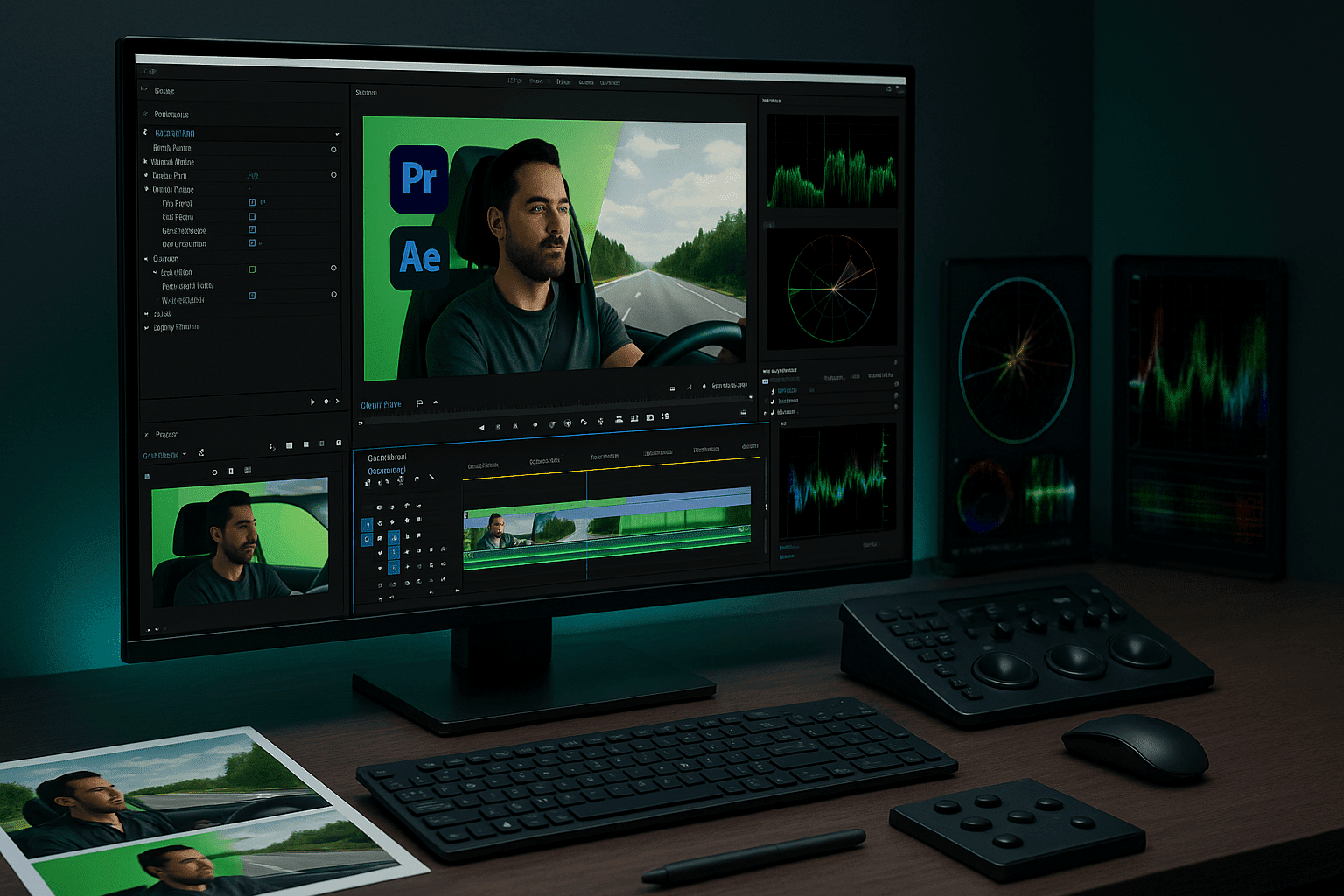
Green Screen Editing is a practical, software-agnostic masterclass designed to help you confidently remove backgrounds, replace scenes, and create realistic composites using industry-standard tools. This course teaches you how to work professionally with green and blue screen footage across Adobe Premiere Pro, Final Cut Pro, and Adobe After Effects, giving you flexibility and real-world production skills.
You will learn how to apply chroma key techniques correctly, clean edges, fix colour spill, refine masks, and blend subjects naturally into new environments. The course focuses on realistic compositing, showing you how to match lighting, colour, motion, and perspective so your final edits look convincing rather than artificial. Real projects such as interviews, driving scenes, animals, and flying objects are used to demonstrate common challenges and professional solutions.
Rather than relying on shortcuts, this Green Screen Editing course helps you understand why certain techniques work. You will gain confidence in choosing the right tools for different scenarios, whether working quickly in a timeline editor or using advanced keying tools for complex shots. The course also introduces efficient workflows, including cross-software integration and advanced compositing techniques used in professional post-production.
By the end of the course, you will be able to handle green screen footage independently, avoid common mistakes, and deliver polished results suitable for marketing videos, YouTube content, interviews, films, and commercial projects. The skills you gain are directly transferable across multiple editing platforms.
At the end of the course, learners receive a free course completion certificate. Multiple premium certificate and transcript options are also available for purchase if required. Students also benefit from 5-star rated support available 24/7 via email, ensuring expert help is always accessible throughout the learning journey.
Who is this course for?
Green Screen Editing is a practical, software-agnostic masterclass designed to help you confidently remove backgrounds, replace scenes, and create realistic composites using industry-standard tools. This course teaches you how to work professionally with green and blue screen footage across Adobe Premiere Pro, Final Cut Pro, and Adobe After Effects, giving you flexibility and real-world production skills.
You will learn how to apply chroma key techniques correctly, clean edges, fix colour spill, refine masks, and blend subjects naturally into new environments. The course focuses on realistic compositing, showing you how to match lighting, colour, motion, and perspective so your final edits look convincing rather than artificial. Real projects such as interviews, driving scenes, animals, and flying objects are used to demonstrate common challenges and professional solutions.
Rather than relying on shortcuts, this Green Screen Editing course helps you understand why certain techniques work. You will gain confidence in choosing the right tools for different scenarios, whether working quickly in a timeline editor or using advanced keying tools for complex shots. The course also introduces efficient workflows, including cross-software integration and advanced compositing techniques used in professional post-production.
By the end of the course, you will be able to handle green screen footage independently, avoid common mistakes, and deliver polished results suitable for marketing videos, YouTube content, interviews, films, and commercial projects. The skills you gain are directly transferable across multiple editing platforms.
At the end of the course, learners receive a free course completion certificate. Multiple premium certificate and transcript options are also available for purchase if required. Students also benefit from 5-star rated support available 24/7 via email, ensuring expert help is always accessible throughout the learning journey.
Requirements
Green Screen Editing is a practical, software-agnostic masterclass designed to help you confidently remove backgrounds, replace scenes, and create realistic composites using industry-standard tools. This course teaches you how to work professionally with green and blue screen footage across Adobe Premiere Pro, Final Cut Pro, and Adobe After Effects, giving you flexibility and real-world production skills.
You will learn how to apply chroma key techniques correctly, clean edges, fix colour spill, refine masks, and blend subjects naturally into new environments. The course focuses on realistic compositing, showing you how to match lighting, colour, motion, and perspective so your final edits look convincing rather than artificial. Real projects such as interviews, driving scenes, animals, and flying objects are used to demonstrate common challenges and professional solutions.
Rather than relying on shortcuts, this Green Screen Editing course helps you understand why certain techniques work. You will gain confidence in choosing the right tools for different scenarios, whether working quickly in a timeline editor or using advanced keying tools for complex shots. The course also introduces efficient workflows, including cross-software integration and advanced compositing techniques used in professional post-production.
By the end of the course, you will be able to handle green screen footage independently, avoid common mistakes, and deliver polished results suitable for marketing videos, YouTube content, interviews, films, and commercial projects. The skills you gain are directly transferable across multiple editing platforms.
At the end of the course, learners receive a free course completion certificate. Multiple premium certificate and transcript options are also available for purchase if required. Students also benefit from 5-star rated support available 24/7 via email, ensuring expert help is always accessible throughout the learning journey.
Career path
Green Screen Editing is a practical, software-agnostic masterclass designed to help you confidently remove backgrounds, replace scenes, and create realistic composites using industry-standard tools. This course teaches you how to work professionally with green and blue screen footage across Adobe Premiere Pro, Final Cut Pro, and Adobe After Effects, giving you flexibility and real-world production skills.
You will learn how to apply chroma key techniques correctly, clean edges, fix colour spill, refine masks, and blend subjects naturally into new environments. The course focuses on realistic compositing, showing you how to match lighting, colour, motion, and perspective so your final edits look convincing rather than artificial. Real projects such as interviews, driving scenes, animals, and flying objects are used to demonstrate common challenges and professional solutions.
Rather than relying on shortcuts, this Green Screen Editing course helps you understand why certain techniques work. You will gain confidence in choosing the right tools for different scenarios, whether working quickly in a timeline editor or using advanced keying tools for complex shots. The course also introduces efficient workflows, including cross-software integration and advanced compositing techniques used in professional post-production.
By the end of the course, you will be able to handle green screen footage independently, avoid common mistakes, and deliver polished results suitable for marketing videos, YouTube content, interviews, films, and commercial projects. The skills you gain are directly transferable across multiple editing platforms.
At the end of the course, learners receive a free course completion certificate. Multiple premium certificate and transcript options are also available for purchase if required. Students also benefit from 5-star rated support available 24/7 via email, ensuring expert help is always accessible throughout the learning journey.
-
- Introduction to Green Screen and Chroma Keying 00:10:00
- Editing a Car Interior Green Screen Scene 00:10:00
- Dog Green Screen Exercise 00:10:00
- Flying Crow Green Screen Practice 00:10:00
- Highway Driving Green Screen Project 00:10:00
- Interview Scene – Green Screen Workflow 00:10:00
-
- Applying the Colour Key Effect 00:10:00
- Working with Blue and Green Screen Footage 00:10:00
- Using the Chroma Keyer Effect 00:10:00
- Important Message About Udemy Reviews 00:10:00
- Edge Correction and Refining Masks 00:10:00
- Cropping and Cleaning Your Green Screen 00:10:00
- Adding Backgrounds in Final Cut Pro X 00:10:00
- Applying Colour Correction 00:10:00
- Final Cut Pro – Wrap-Up 00:10:00
- Introduction and Applying the Colour Key Effect 00:10:00
- Using the Ultra Key Effect 00:10:00
- Cropping and Cleaning Green Screen Footage 00:10:00
- Adding Backgrounds in Premiere Pro 00:10:00
- Colour Correction Techniques 00:10:00
- Premiere Pro – Wrap-Up 00:10:00
- Introduction to Green Screen in Final Cut Pro X 00:10:00
- Cropping and Cleaning Up Green Screen Footage 00:10:00
- Adding Backgrounds in Final Cut Pro X 00:10:00
- Colour Correction and Edge Refinement 00:10:00
- Final Cut Pro X – Green Screen Summary 00:10:00
- Exam of Green Screen Editing Masterclass: Premiere Pro, Final Cut & After Effects 00:50:00

No Reviews found for this course.
Is this certificate recognized?
Yes, our premium certificate and transcript are widely recognized and accepted by embassies worldwide, particularly by the UK embassy. This adds credibility to your qualification and enhances its value for professional and academic purposes.
I am a beginner. Is this course suitable for me?
Yes, this course is designed for learners of all levels, including beginners. The content is structured to provide step-by-step guidance, ensuring that even those with no prior experience can follow along and gain valuable knowledge.
I am a professional. Is this course suitable for me?
Yes, professionals will also benefit from this course. It covers advanced concepts, practical applications, and industry insights that can help enhance existing skills and knowledge. Whether you are looking to refine your expertise or expand your qualifications, this course provides valuable learning.
Does this course have an expiry date?
No, you have lifetime access to the course. Once enrolled, you can revisit the materials at any time as long as the course remains available. Additionally, we regularly update our content to ensure it stays relevant and up to date.
How do I claim my free certificate?
I trust you’re in good health. Your free certificate can be located in the Achievement section. The option to purchase a CPD certificate is available but entirely optional, and you may choose to skip it. Please be aware that it’s crucial to click the “Complete” button to ensure the certificate is generated, as this process is entirely automated.
Does this course have assessments and assignments?
Yes, the course includes both assessments and assignments. Your final marks will be determined by a combination of 20% from assignments and 80% from assessments. These evaluations are designed to test your understanding and ensure you have grasped the key concepts effectively.
Is this course accredited?
We are a recognized course provider with CPD, UKRLP, and AOHT membership. The logos of these accreditation bodies will be featured on your premium certificate and transcript, ensuring credibility and professional recognition.
Will I receive a certificate upon completion?
Yes, you will receive a free digital certificate automatically once you complete the course. If you would like a premium CPD-accredited certificate, either in digital or physical format, you can upgrade for a small fee.
Course Features
Price
Study Method
Online | Self-paced
Course Format
Reading Material - PDF, article
Duration
6 hours, 55 minutes
Qualification
No formal qualification
Certificate
At completion
Additional info
Coming soon
- Share

Mixology Marketing: Building a Successful Bartending Business
Course Line242£490.00Original price was: £490.00.£14.99Current price is: £14.99.Interpreter Level 8 Advanced Diploma
Course Line240£490.00Original price was: £490.00.£14.99Current price is: £14.99.NEBOSH: Risk Assessment & Control Measures Explained
Course Line237£490.00Original price was: £490.00.£14.99Current price is: £14.99.


Related Courses
Microsoft Excel for Business: Beginner to Advanced Data Analysis
£490.00Original price was: £490.00.£14.99Current price is: £14.99.237Financial Modelling in Excel: Build Forecasting & Budget Models
£490.00Original price was: £490.00.£14.99Current price is: £14.99.237Professional Proofreading & Editing Skills: Grammar, Style & Error-Free Writing
£490.00Original price was: £490.00.£14.99Current price is: £14.99.237




Related Courses
Microsoft Excel for Business: Beginner to Advanced Data Analysis
£490.00Original price was: £490.00.£14.99Current price is: £14.99.237Financial Modelling in Excel: Build Forecasting & Budget Models
£490.00Original price was: £490.00.£14.99Current price is: £14.99.237Professional Proofreading & Editing Skills: Grammar, Style & Error-Free Writing
£490.00Original price was: £490.00.£14.99Current price is: £14.99.237

